
Community Fibre Essential 35Mbps Broadband
Community Fibre Essential 35 is the provider’s lowest-priced home broadband package. It offers an average 35Mbps download speed and a 35Mbps upload speed over a full-fibre connection.
Community Fibre calls Essential 35 a no-criteria social tariff. Unlike most social tariffs, customers do not need to receive Universal Credit, Pension Credit or another qualifying benefit.
The package comes with a shorter 12-month contract, unlimited data and a Wi-Fi 5 router. Its equal upload speed is particularly useful for video calls, uploading files and backing up photos.
Essential 35 is best for one or two people with fairly light internet use. Larger households and customers who frequently download games should consider a faster package.
Customers comparing the complete range of packages can read our Community Fibre broadband review.
Community Fibre Essential 35 at a glance
| Feature | Essential 35 details |
|---|---|
| Average download speed | 35Mbps |
| Upload speed | 35Mbps |
| Standard monthly price | £12.50 |
| Minimum contract | 12 months |
| Setup cost | £0 |
| Data allowance | Unlimited |
| Included router | Wi-Fi 5 dual-band router |
| Benefits check | Not required |
| Price during minimum term | Fixed for 12 months |
| Out-of-contract increase | £4 per month |
| Standard IP arrangement | CGNAT |
| Public IPv4 option | £4 per month |
Essential 35 eligibility
Community Fibre makes Essential 35 available without a benefits check. New customers can order it in areas served by the provider’s full-fibre network.
This differs from social tariffs offered by BT, Virgin Media, Vodafone and several other providers. Those packages normally require the account holder to receive an eligible benefit.
Existing Community Fibre customers can also ask to move to Essential 35. Community Fibre directs customers experiencing payment difficulties towards this package and states that all customers are eligible.
Customers already inside a minimum contract should contact Community Fibre before changing packages. Moving to Essential may start a new minimum term or alter the existing agreement.
Speed and everyday performance
Essential offers an average 35Mbps download speed. The upload speed is also 35Mbps because Community Fibre uses a full-fibre connection with equal download and upload speeds.
A 35Mbps connection gives a small household enough bandwidth for:
- Web browsing and online shopping
- Email and social media
- HD and 4K streaming on a limited number of devices
- Video calls and remote working
- Online learning
- Music streaming
- Standard online gaming
Online games use little bandwidth once play has started. Latency and connection consistency have a greater effect on gameplay than the package’s maximum speed.
Large downloads take longer. A 50GB game would require more than three hours under ideal conditions at 35Mbps. Actual download time also depends on Wi-Fi quality, network demand and the speed available from the game server.
The package becomes restrictive when several people stream, download files and join video calls at the same time. Homes with several televisions, computers, consoles and phones will receive more spare capacity from a 150Mbps or faster package.
Equal upload speeds
The 35Mbps upload speed is one of Essential’s main advantages.
Many similarly priced fibre packages using FTTC or Openreach FTTP offer a lower upload speed than their download speed. Community Fibre offers the same speed in both directions.
Faster uploads reduce the time required to:
- Back up photographs and videos
- Send large email attachments
- Upload work files
- Share videos
- Save files to cloud storage
- Maintain video quality during calls
Equal speeds do not increase the speed of ordinary web browsing, but they benefit homes that frequently send files or use cloud services.
Households suited to Essential 35
Essential 35 is ideal for one person or a couple who mainly browse, stream television, use social media and make video calls.
It can also serve a small family when online activity remains moderate. However, its 35Mbps capacity must be shared between every connected device.
The package is less suitable for:
- Larger households with several active users
- Several simultaneous 4K streams
- Frequent console and computer game downloads
- Heavy cloud-backup use across several devices
- Homes with a large collection of security cameras
- Customers who need multi-gigabit wired networking
Community Fibre’s faster packages cost more but substantially reduce download times and give busy households additional bandwidth.
Router and Wi-Fi
Essential 35 includes a dual-band Wi-Fi 5 router. Community Fibre’s current router allocation for packages below 100Mbps is the Linksys Velop WHW01.
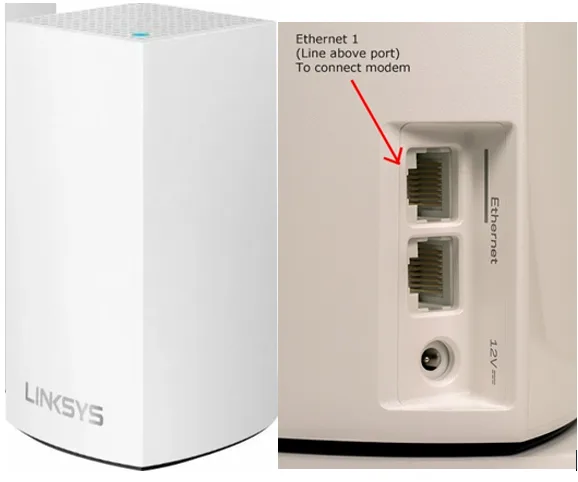
The router uses the 2.4GHz and 5GHz Wi-Fi bands. The 2.4GHz band reaches further but offers lower speeds, while 5GHz gives faster Wi-Fi over a shorter distance.
Wi-Fi 5 can deliver considerably more than 35Mbps under suitable conditions, so the wireless standard does not restrict the package’s internet speed. The greater concern is Wi-Fi coverage in larger homes or premises with thick walls.
Place the router in an open, central location where possible. Avoid putting it inside a cupboard, behind a television or close to a microwave.
Essential customers do not receive the Wi-Fi 6 or Wi-Fi 7 equipment supplied with selected faster packages. Customers who need wider coverage can use compatible mesh equipment, but any additional equipment adds to the overall cost.
Contract, setup and price changes
Essential 35 comes with a 12-month minimum contract. Most standard Community Fibre packages come with longer agreements, making Essential useful for customers who do not want a 24-month commitment.
The main contract details are:
- No setup fee
- No annual increase during the 12-month minimum term
- A £4 monthly increase after the minimum term
- Unlimited data
- No benefits assessment
The out-of-contract increase applies if the customer remains on the package after the initial 12 months without agreeing to a new offer.
Check the renewal options before the minimum term ends. Community Fibre may offer another contract, or the customer can compare alternative providers without continuing at the increased price.
Installation and availability
Essential 35 uses Community Fibre’s own fibre network. It does not require an active Openreach telephone line or use the home’s old telephone socket.
For a new installation, an engineer brings the fibre cable into the home and installs the fibre connection equipment. The router then connects to this equipment using an Ethernet cable.
Flats and apartment buildings are often connected through equipment installed in a communal area. An engineer completes the connection from the building’s fibre equipment to the individual flat.
Tenants may need permission if the installation requires drilling or new external cabling. Community Fibre already has agreements in place with many housing associations, councils and building owners.
Availability depends on the individual premise. Service in the same street or building does not guarantee that every home can order it, so customers must complete a postcode and premise check.
CGNAT and public IP addresses
New Community Fibre customers receive a CGNAT connection as standard. This has applied to customers signing up or renewing since 4 June 2026.
CGNAT allows several customers to share one public internet address. It does not normally interfere with browsing, television streaming, video calls or joining online games.
The restriction appears when a customer needs an unsolicited incoming connection from the internet. CGNAT prevents conventional port forwarding, which can affect:
- Hosting a personal game server
- Direct remote access to CCTV equipment
- Running a server from home
- Receiving incoming VPN connections
- Using certain peer-to-peer applications
- Direct remote access to home-network devices
Community Fibre offers a dynamic public IPv4 address for an additional monthly charge. This enables port forwarding but does not give residential customers a fixed IP address.
Static IP addresses are reserved for qualifying business services.
Separate free broadband scheme
Community Fibre also participates in a separate scheme offering 12 months of free 50Mbps full-fibre broadband to some Department for Work and Pensions customers.
This scheme is not the same as Essential 35. It is available through referrals from selected Jobcentre Plus branches and applies to eligible disabled customers, carers and people who have received benefits for more than six months.
Participating branches include:
- Woolwich
- Peckham
- Tower Hamlets
- Harlesden
- Barnsbury
- Finsbury Park
- Streatham
- Hoxton
Customers cannot order this offer through the normal Community Fibre checkout. They should ask their Jobcentre Plus work coach about eligibility and current availability.
Essential 35 remains available when someone cannot obtain the free package because it does not require a Jobcentre referral or benefits check.
Free broadband for community spaces
Community Fibre offers free full-fibre connections to qualifying community spaces within its network area.
The scheme includes connections with speeds up to 1,000Mbps for premises such as libraries, community centres, housing associations and other local organisations.
An organisation must contact Community Fibre’s Community Investment team to request a connection. Approval depends on the premises, the organisation and the availability of Community Fibre’s network.
This community programme is separate from home broadband packages and cannot be used to obtain a free residential connection.
Essential 35 compared with other social tariffs
The table compares several low-cost broadband packages available in London.
| Package | Average download speed | Monthly price |
|---|---|---|
| Community Fibre Essential | 35Mbps | £12.50 |
| Hyperoptic Fair Fibre Fast | 50Mbps | £12 |
| G.Network Essential Fibre | 50Mbps | £15 |
| Virgin Media Essential Broadband | 15Mbps | £12.50 |
| BT Home Essentials | 36Mbps | £16 |
Community Fibre is not the fastest package in this comparison. Hyperoptic and G.Network offer faster download speeds, but both require eligible customers to complete a benefits assessment.
Essential 35 has two important advantages: it is open without a benefits check, and it offers a 35Mbps upload speed equal to its download speed.
Availability remains the main restriction. Community Fibre, Hyperoptic and G.Network serve selected buildings and areas, while BT and Virgin Media have wider UK coverage.
Is Community Fibre Essential 35 broadband any good?
Community Fibre Essential 35 is one of the best low-cost full-fibre packages available in London.
The 35Mbps download speed is modest, but it is sufficient for one or two light-to-moderate users. The equal 35Mbps upload speed also gives it an advantage over many entry-level packages.
The absence of a benefits check makes the package accessible to customers who need cheaper broadband but do not receive a qualifying benefit. Its 12-month contract, free setup and fixed price during the minimum term further improve its value.
There are limitations. Larger households can exhaust 35Mbps quickly, the included router only offers Wi-Fi 5, and CGNAT prevents port forwarding unless the customer pays for a public IPv4 address.
Essential 35 is an excellent choice for smaller households that prioritise a low monthly cost over faster downloads. Customers with several active users should compare Community Fibre’s 150Mbps and faster packages before ordering.
Frequently asked questions
Do customers need to receive benefits for Community Fibre Essential?
No. Community Fibre Essential 35 is a no-criteria social tariff. New customers do not need to receive Universal Credit, Pension Credit or another benefit.
Can existing Community Fibre customers move to Essential 35?
Community Fibre states that all customers are eligible for Essential 35. Existing customers should contact customer service to request the change, particularly if they are struggling to pay their current bill.
Is 35Mbps enough for streaming and gaming?
Yes, for a small household. A 35Mbps connection can manage browsing, video calls, online gaming and a limited number of video streams. Several simultaneous 4K streams or large game downloads will use most of the available bandwidth.
Does Essential 35 use CGNAT?
Yes. Customers who sign up or renew from 4 June 2026 receive CGNAT as standard. Ordinary internet use remains unaffected, but conventional port forwarding is unavailable.
Can Essential customers obtain a public IP address?
Yes. Community Fibre offers a dynamic public IPv4 address for £4 per month. This allows port forwarding. Residential customers cannot obtain a static IP address.