
Community Fibre Broadband Review 2026
Community Fibre is one of London’s largest alternative full fibre providers. It offers equal download and upload speeds, packages from 35Mbps to 5Gbps and a choice of Wi-Fi 5, Wi-Fi 6 or Wi-Fi 7 routers according to the selected plan.
Its broadband is available across parts of all 32 London boroughs and selected areas of Surrey and Sussex. Coverage remains much smaller than BT, Sky, Virgin Media or Vodafone, so the first step is always an availability check for the individual home.
Customer feedback is another positive point. Community Fibre had a Trustpilot score of 4.7 out of 5 from more than 94,000 reviews when checked on 28 August 2026. Its technical advantages are equally persuasive, although customers need to consider annual price increases, CGNAT and the limitations of multi-gigabit Wi-Fi.
In a nutshell: Community Fibre is an excellent choice in enabled areas. Its 100Mbps to 500Mbps packages are suitable for most households, while 1Gbps and faster plans give heavy users extra capacity. Equal upload speeds are valuable for cloud storage, video calls and sending large files. However, customers needing port forwarding must add a public IPv4 address.
Today’s Best Deals
| Plan | Average Speed | Offer | Price |
|---|---|---|---|
| Community Fibre 1Gbps24 month contract | 1000Mbdownload1000Mbupload | £165 voucherEnds 28th OctFree setup | £20 per month£387 contract costGet deal |
Wi-Fi 7 router router included.
| |||
| Community Fibre 500Mbps24 month contract | 500Mbdownload500Mbupload | £95 voucherEnds 28th OctFree setup | £16 per month£361 contract costGet deal |
Wi-Fi 6 router router included.
| |||
| Community Fibre 100Mbps24 month contract | 100Mbdownload100Mbupload | £80 voucherEnds 28th OctFree setup | £14 per month£328 contract costGet deal |
Wi-Fi 6 router router included.
| |||
Use our postcode checker to compare deals available at your address
Community Fibre broadband at a glance
| Feature | Details |
|---|---|
| Broadband network | Community Fibre’s own full fibre network |
| Connection type | Full fibre to the premises |
| Average download speeds | 35Mbps to 5Gbps |
| Upload speeds | Equal to the download speeds |
| Data usage | Unlimited |
| Contracts | 12, 18 or 24 months, depending on the package and ordering channel |
| Annual price increase | Current offers increase by £3 a month each April |
| Standard installation | Included with current 12-month and 24-month offers |
| Router | Linksys Wi-Fi 5, Wi-Fi 6 or Wi-Fi 7 equipment |
| Premium WiFi | 50Mbps room guarantee with eligible packages |
| Satisfaction guarantee | 30 days |
| IP address | CGNAT by default; dynamic public IPv4 add-on available |
| Home phone and TV | Optional Calls and Netgem-powered television services |
| Social tariff | Essential 35 available without a benefits check |
| Coverage | Parts of all 32 London boroughs and selected Surrey and Sussex areas |
Community Fibre broadband pros and cons
Pros
- Equal download and upload speeds on all residential packages
- Full fibre connection directly into the home
- Packages available up to 5Gbps
- Wi-Fi 7 equipment with selected Premium packages
- Expected latency of 0–10ms
- Standard installation included with current comparison offers
- 30-day satisfaction guarantee
- Essential 35 available without a benefits check
Cons
- Limited regional availability
- Current deals include annual price increases
- CGNAT applies by default to new and renewing residential customers
- Public IPv4 address costs extra
- Packages below 100Mbps receive an older Wi-Fi 5 router
- Full multi-gigabit speeds require compatible wired devices
- Not part of Ofcom’s voluntary automatic compensation scheme
Is Community Fibre broadband any good?
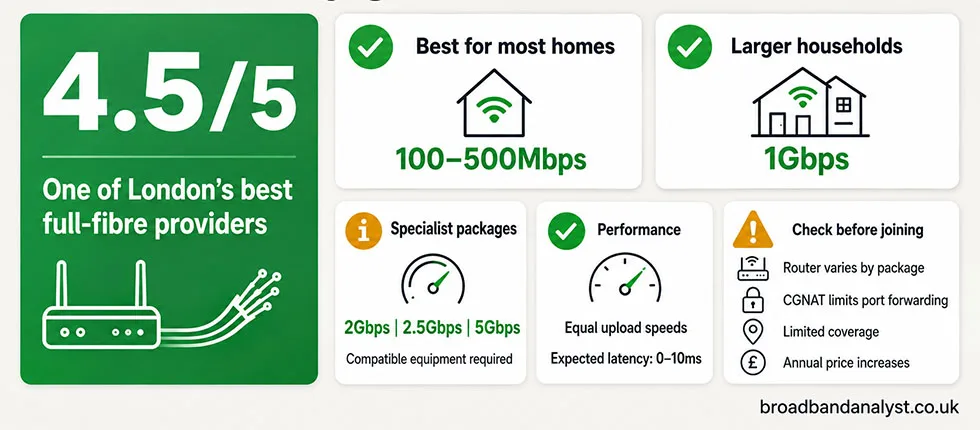
Yes. Community Fibre combines fast FTTP broadband, equal upload speeds and competitive introductory offers. Its expected 0–10ms latency is also suitable for online gaming, video calls and remote working.
The 100Mbps to 500Mbps packages give most households enough bandwidth without paying for speed that their devices rarely use. Larger households, frequent game downloads and heavy cloud users can benefit from 1Gbps.
The 2Gbps, 2.5Gbps and 5Gbps packages have a more specialised purpose. Most televisions, games consoles and laptops cannot use those speeds through a single connection. Customers need multi-gigabit Ethernet equipment or enough simultaneous activity across several devices.
The router range is less straightforward than the old claim that every package includes Wi-Fi 6. Entry-level customers receive Wi-Fi 5, standard packages receive Wi-Fi 6, and selected Premium packages receive Wi-Fi 7.
CGNAT is the main technical disadvantage. It does not interfere with ordinary streaming, browsing or joining online games, but it prevents port forwarding. Customers using remote CCTV access, personal servers or inbound VPNs need the paid public IPv4 option.
Community Fibre earns 4.5 out of 5. It is one of the best providers available in London, but restricted coverage, annual price increases and CGNAT prevent a perfect rating.
Customers suited to Community Fibre
| Community Fibre is ideal for | Another provider is better for |
|---|---|
| Customers wanting equal download and upload speeds | Homes outside Community Fibre’s regional coverage |
| Home workers who regularly upload large files | Customers needing a static residential IP address |
| Gamers wanting a low-latency FTTP connection | Homes requiring automatic mobile broadband backup |
| Larger households using many devices at once | Customers wanting a large premium television package |
| Customers wanting Wi-Fi 7 with an eligible Premium package | Smaller homes that do not need Premium WiFi |
The lower-speed packages are suitable for one or two people using streaming, browsing and video calls. Equal upload speeds also help with cloud storage and remote work.
A typical family should look at the 300Mbps to 500Mbps range. These speeds give several devices enough bandwidth for 4K streaming, gaming, video calls and downloads at the same time.
A 1Gbps package is better suited to larger households, frequent game downloads and people who transfer large files regularly. Packages above 1Gbps are best for customers with a multi-gigabit home network.
Community Fibre broadband options
Community Fibre does not offer the same range of plans through every sales channel. Available options can include Essential 35, 75Mbps, 100Mbps, 150Mbps, 300Mbps, 500Mbps, 600Mbps, 1Gbps, 2Gbps, 2.5Gbps and 5Gbps.
Some older customers remain on plans that no longer appear among the principal new-customer offers. The postcode result and pre-contract summary identify the speeds available at the individual home.
| Household use | Suggested speed | Reason |
|---|---|---|
| Browsing, HD streaming and video calls | 35Mbps to 100Mbps | Adequate for lighter use across a limited number of devices |
| A typical family with several connected devices | 150Mbps to 300Mbps | Enough capacity for streaming, gaming and home working |
| A larger household using several services together | 500Mbps to 600Mbps | Faster downloads and more bandwidth for simultaneous activity |
| Frequent large downloads and cloud transfers | 1Gbps | Fast downloads with the same upload speed |
| Multi-gigabit wired network | 2Gbps to 5Gbps | Additional bandwidth across compatible devices |
A 4K television stream normally uses only a small part of a 150Mbps or 300Mbps connection. Faster plans reduce large-file download times, but they do not improve the picture quality once a stream already receives enough bandwidth.
- Current comparison offers come with 12-month or 24-month contracts. Selected ordering routes also include 18-month options.
- The monthly charge increases on 1 April each year. The deal table shows the exact amount payable after each increase.
- A customer joining shortly before April can receive the first increase early in the minimum term.
- The broadband charge increases after the minimum term, after which the service continues on a rolling 30-day agreement.
- The first bill can include a part-month charge between activation and the normal billing date.
- The pre-contract summary confirms the contract length, expected speeds, annual increases and additional services.
Essential 35 social tariff
Essential 35 is Community Fibre’s low-cost full fibre package. It is available to all new customers in enabled areas, rather than only those receiving specific benefits.
| Feature | Essential 35 details |
|---|---|
| Average download speed | 35Mbps |
| Upload speed | 35Mbps |
| Monthly price | £12.50 |
| Setup | £0 |
| Annual increase during the minimum term | None |
| Router | Linksys WHW01 Wi-Fi 5 |
| Benefits evidence | Not required |
The package is adequate for browsing, video calls, HD streaming and routine online tasks. Several simultaneous 4K streams or large downloads can consume much of its available bandwidth.
Community Fibre also offers its Essential 35Mbps package on a shorter 12-month contract. It includes equal download and upload speeds and is available to new customers without a benefits check. Our Community Fibre Essential broadband guide explains its router, contract terms and suitability in more detail.
Community Fibre routers and Premium WiFi
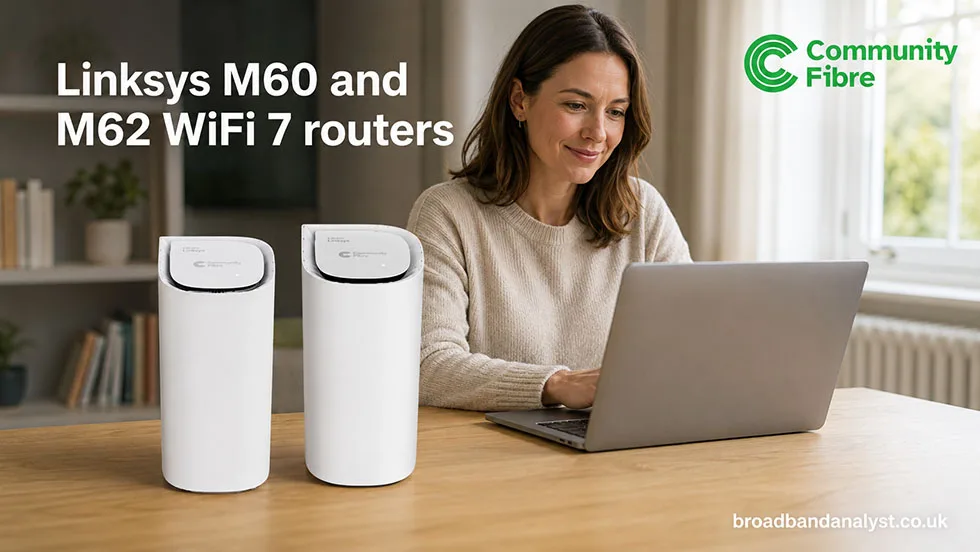
Community Fibre supplies different Linksys routers according to the selected speed. Not every customer receives the latest Wi-Fi standard.
| Package speed | Current router | Wi-Fi standard |
|---|---|---|
| Below 100Mbps | Linksys WHW01 | Dual-band Wi-Fi 5 |
| 100Mbps to 500Mbps | Linksys MX20 | Dual-band Wi-Fi 6 |
| 1Gbps to 2.5Gbps Premium | Linksys M60 | Dual-band Wi-Fi 7 |
| 5Gbps Premium | Linksys M62 | Tri-band Wi-Fi 7 |
The Linksys WHW01 is old equipment, but it remains capable of delivering the speed of the Essential 35 and 75Mbps packages. Its limitations become clearer in a busy home with many connected devices.
The Linksys MX20 uses Wi-Fi 6 and is better suited to a typical multi-device household. It can form part of a Linksys mesh network and uses the Linksys app for management.
The M60 and M62 introduce Wi-Fi 7 on eligible Premium packages. Wi-Fi 7 can deliver faster wireless connections to compatible devices, although it does not guarantee the full 2.5Gbps or 5Gbps broadband speed to one device.
Existing customers can have equipment from an earlier router range. Some customers in former Box Broadband areas also use other equipment, including Nokia routers.
Premium WiFi
Premium WiFi combines an eligible faster package with an engineer-installed Linksys mesh network. It is available to new customers taking a 1Gbps, 2.5Gbps or 5Gbps Premium package with a 24-month contract.
The engineer assesses the home and installs additional Linksys units where needed. Ethernet cabling can connect the mesh units when a wireless link between them would not deliver adequate performance.
The service guarantees at least 50Mbps in every room of a home with no more than five bedrooms, 12 rooms and three floors.
Community Fibre must have an opportunity to investigate and improve the installation before the guarantee applies. If it cannot deliver the guaranteed room speed after those steps, the customer receives three months of broadband free.
The guarantee applies to room coverage rather than the full package speed. A 1Gbps Premium customer receives a 50Mbps room guarantee, not a promise of 1Gbps over Wi-Fi throughout the home.
Premium WiFi is most useful in a larger home, a premise with thick internal walls or a household needing wireless access across several floors. A smaller flat can receive adequate coverage from one well-placed router.
Speed, reliability and latency
Community Fibre offers equal download and upload speeds. This gives it a significant advantage over many Openreach and cable packages when customers send large files, complete cloud backups or use several video calls.
A 500Mbps package offers a fully 500Mbps upload speed as well as the same download speed, subject to the personalised information supplied with the order.
Its expected ping range is 0–10ms. That is suitable for gaming and real-time communication, but buying a faster package does not automatically reduce latency.
The route to the server, activity on the home network and the choice between Wi-Fi and Ethernet can have a greater effect on gaming response than the difference between a 500Mbps and 1Gbps package.
| Package | Expected wired speed | Expected Wi-Fi speed |
|---|---|---|
| 500Mbps | 500Mbps | 250–450Mbps |
| 1Gbps | 1Gbps | 500–750Mbps |
| 2Gbps | 2Gbps | 500–800Mbps |
| 2.5Gbps | 2.3Gbps | 700–950Mbps |
| 5Gbps | 5Gbps | 800–1,050Mbps |
A wired device also needs a suitable Ethernet port, network adapter and cable. A gigabit Ethernet connection cannot deliver the full speed of a multi-gigabit package.
Community Fibre’s FTTP technology avoids the distance-related speed loss associated with the copper section of an FTTC line. Weak Wi-Fi, busy wireless channels, older devices and distant test servers can still reduce the speed reaching an individual device.
Community Fibre experienced two widespread service interruptions during February 2025. Smaller local faults can also occur, so claims that any broadband provider never suffers congestion or disruption would be unrealistic.
Community Fibre is not part of Ofcom’s voluntary automatic compensation scheme. It publishes its own payments for selected installation problems:
| Service failure | Published compensation |
|---|---|
| Missed engineer appointment or cancellation with less than 24 hours’ notice | £10 |
| Delayed activation after the agreed date | £2 per day |
Community Fibre Calls, TV and other extras
Community Fibre offers optional phone, television, mobile and security services alongside broadband. None is required to use the internet connection.
| Service or extra | Main details | Monthly charge |
|---|---|---|
| Community Fibre Calls | Unlimited calls to UK landlines, UK mobiles and freephone numbers | £10 |
| TV with a 24-month broadband contract | Netgem-powered 4K box, Freeview and streaming apps | £12 |
| TV with a 12-month broadband contract | Netgem-powered 4K box, Freeview and streaming apps | £17 |
| Unlimited UK eSIM | UK data, calls and texts for a compatible phone | £17 |
| eSIM for broadband customers | Discount for an active Community Fibre broadband customer | £15 |
| Automatic broadband backup | Not available | — |
Community Fibre Calls uses the broadband connection rather than an analogue telephone line. Customers can transfer an existing landline number, with the process normally taking 12 working days after the Calls service activates.
Do not cancel the previous phone service until Community Fibre confirms that the number has transferred. The home handset stops working if the broadband connection or mains electricity fails, although the Community Fibre Home Phone app can continue over mobile data.
Vulnerable customers who need access to the phone service during a power cut can request a battery backup unit without an additional charge. It cannot restore Calls during a broadband network outage.
Community Fibre TV uses a Netgem-powered 4K box. It combines Freeview channels with catch-up services, streaming applications and on-demand content. A television aerial is required for Freeview reception and is not included with the box.
The Unlimited UK eSIM includes UK data, calls and texts, subject to a fair usage policy. International calls, international texts, overseas roaming and premium-rate numbers are excluded.
Installation and availability
Community Fibre has reached more than 1.3 million premises. Its network is present in parts of all 32 London boroughs, including Havering and the City of London.
Availability still differs between neighbouring streets and individual flats. A postcode and full-address check gives the correct package result for the home.
Selected areas of Surrey and Sussex receive Community Fibre following its acquisition of Box Broadband. Coverage outside London remains limited, and some South East customers use different network equipment.
Community Fibre normally brings the cable to the home through an underground duct or from a nearby pole. The engineer installs an external connection box, drills a small entry hole and fits an optical network terminal inside.
The router connects to the optical terminal rather than to a telephone socket. A normal installation can take up to two hours after the engineer begins work, although external access problems or additional cabling can extend the appointment.
A standard installation places the optical terminal and router no more than 10 metres from the fibre entry point. The engineer should agree the route and internal position before drilling.
Fibre to Your Room extends the internal cable route to a maximum of 40 metres. It can reach a suitable room on the ground, first or second floor.
Unconverted lofts, basements, detached garages and outbuildings are excluded. Flats can also require permission from a landlord, housing association or freeholder before new cables can pass through shared parts of the building.
Switching to Community Fibre
Community Fibre takes part in One Touch Switching. For an eligible transfer, Community Fibre coordinates the move and the previous broadband service closes after the new connection becomes active.
Do not cancel the existing broadband independently. Doing so can interrupt the managed transfer and leave the home without a connection.
One Touch Switching does not remove an early termination charge from the previous provider. Check the current contract end date before placing the new order.
The usual cooling-off period lasts 14 days from the order. Community Fibre also offers a 30-day satisfaction guarantee, but customers must report the problem and allow the provider an opportunity to correct it.
The Broadband Genie reward uses a separate condition. Cancelling within 60 days of installation invalidates the voucher, including a cancellation made under the satisfaction guarantee.
Leaving during the minimum term normally results in an early termination charge. The current calculation uses 90% of the core monthly broadband charge multiplied by the remaining contract months.
Community Fibre can transfer the service when the new home is enabled. An early termination charge can still apply when the new home is outside its coverage because the original contract relates to the current premise.
After a cancellation, Community Fibre sends return packaging and a prepaid label. Charges are added for unreturned equipment and credited after the items arrive.
| Equipment | Non-return charge |
|---|---|
| Router or mesh unit | £56 each |
| Optical network terminal | £40 |
| Voice adapter | £30 |
| Netgem TV box | £80 |
| Netgem remote control | £15 |
CGNAT and public IP addresses
Community Fibre introduced CGNAT as the default for residential customers joining or renewing from 4 June 2026.
CGNAT allows several customers to share one public IPv4 address. It does not normally interfere with browsing, streaming, cloud services, video calls or joining an online game.
The restriction concerns incoming connections. Port forwarding is unavailable under CGNAT, which can affect remote CCTV access, personal servers, inbound VPNs, game hosting and direct access to equipment inside the home.
| IP option | Residential availability | Monthly charge |
|---|---|---|
| CGNAT | Default | Included |
| Dynamic public IPv4 | Optional add-on with port forwarding | £4 |
| Static public IPv4 | Not available | Business broadband only |
The residential public address is dynamic and can change. Customers needing a permanent static address should consider a business package or use a suitable dynamic DNS service.
Adding a public address does not increase the broadband speed or automatically reduce gaming latency.
Customer service and complaints
Community Fibre offers telephone assistance, live chat and an online contact form. Opening times depend on the department.
| Contact method | Opening hours or response target |
|---|---|
| Telephone: 0800 082 0770 | Monday to Friday, 8am–9pm; weekends and bank holidays, 9am–7pm |
| Customer service and technical live chat | Every day, 9am–7pm, including bank holidays |
| Sales live chat | Monday to Friday, 9am–8pm; weekends and bank holidays, 9am–5pm |
| Installation live chat | Monday to Saturday, 9am–5pm |
| Online contact form | Within two working days |
| Trustpilot | 4.7 out of 5 from more than 94,000 reviews on 28 August 2026 |
Many favourable reviews mention helpful engineers, fast installation and good value. Critical reviews commonly concern appointments, billing, outages and delays in resolving individual account problems.
Customers making a formal complaint should retain account details, dates, emails, screenshots and speed-test results. Community Fibre’s complaints team targets an initial response within seven working days.
An unresolved dispute can go to the Communications Ombudsman after a deadlock letter or six weeks without a resolution. Community Fibre does not appear among the providers participating in Ofcom’s residential broadband speeds code.
Community Fibre compared with other providers
Community Fibre’s main advantages are equal upload speeds, competitive deals and fast FTTP packages. Its competitors offer wider availability or a broader range of household services.
| Provider | Advantage over Community Fibre | Reason to choose Community Fibre |
|---|---|---|
| BT | Wider availability, television, Digital Voice and optional broadband backup | Equal upload speeds, faster maximum package and competitive broadband-only deals |
| Virgin Media | Wider availability and larger television bundles | Equal upload speeds across the range and an FTTP-only network |
| Sky | Sky television, wider availability and selected 5Gbps packages with Wi-Fi 7 | Simpler broadband options and competitive London deals |
| Vodafone | Wider full-fibre availability and optional mobile broadband backup | Faster maximum package and direct access to Community Fibre services |
| Hyperoptic | Flexible contracts in selected buildings | Faster maximum speed and Premium WiFi options |
BT is the better choice for national availability and customers wanting television, Digital Voice or broadband backup. Community Fibre offers much faster upload speeds than BT’s standard Openreach packages.
Virgin Media reaches many London homes that cannot order Community Fibre. Its cable packages offer fast downloads but much lower uploads, while its newer FTTP network offers equal speeds in selected areas.
Sky now offers selected multi-gigabit packages with equal speeds and Wi-Fi 7 equipment. Vodafone offers wider full-fibre availability and an optional broadband backup service. Hyperoptic remains a close alternative in apartment buildings reached by both networks.
About Community Fibre
Community Fibre is an independent full-fibre network operator serving London and selected parts of the South East. It builds and operates its principal London FTTP network rather than using the Openreach access network.
The network has reached more than 1.3 million premises across parts of all 32 London boroughs. Community Fibre’s acquisition of Box Broadband extended its service into selected areas of Surrey and Sussex.
Community Fibre also installs free gigabit connections in selected community centres and shared facilities through partnerships with councils, housing associations and local organisations.
The provider won Best Consumer ISP with more than 100,000 customers at the 2025 ISPA Awards. It also received awards for business broadband, community engagement and environmental work.
Community Fibre broadband FAQs
Yes. New and renewing residential customers receive CGNAT by default.
A dynamic public IPv4 address is available as a paid monthly add-on. It enables port forwarding for remote CCTV access, personal servers, inbound VPNs and other services requiring an incoming connection.
Static IP addresses are limited to business broadband.
No. Community Fibre’s expected Wi-Fi range is 500–800Mbps on the 2Gbps package and 800–1,050Mbps on the 5Gbps package.
Receiving more than 1Gbps through a wired connection requires a compatible multi-gigabit Ethernet port, suitable network adapter and appropriate cable.
Yes. The satisfaction guarantee and affiliate reward have different eligibility periods.
A qualifying customer can cancel broadband under the 30-day guarantee, but cancellation within 60 days of installation invalidates the voucher.
A standard installation places the optical terminal and router no more than 10 metres from the fibre entry point.
Fibre to Your Room allows a cable route of up to 40 metres to a suitable room on the ground, first or second floor. The engineer must approve the proposed route.
Unconverted lofts, basements, detached garages and outbuildings are excluded.
The home handset stops working if the broadband equipment loses power or the internet connection fails.
The Community Fibre Home Phone app can continue over mobile data when the mobile network remains available. Vulnerable customers can request a battery backup unit for use during a power cut.
A battery cannot restore the Calls service during a broadband network outage.