
Community Fibre is our first pick for broadband-only households that can get all three, provided its full contract cost is close to Hyperoptic’s. It gives you fast uploads, a Wi-Fi 7 router on its London gigabit tier and the strongest results of the three in Opensignal’s London comparison.
Choose Hyperoptic if you need a shorter commitment or its quote comes in cheaper for the speed you want. Virgin Media is the better fit if you need its wider coverage or a TV bundle. If you regularly upload large files, check which Virgin network serves your home and read the upload figure on the quote.
Coverage, speeds and contracts at a glance
| Feature | Community Fibre | Virgin Media | Hyperoptic |
|---|---|---|---|
| Where to look | London and selected addresses in Surrey and West Sussex | UK-wide footprint across its cable and full fibre networks | Selected buildings and homes in 64 UK towns and cities |
| Connection into the home | Fibre to the premises | Coaxial cable or XGS-PON full fibre, depending on address | Fibre to the flat, or fibre to the building with Ethernet to the flat |
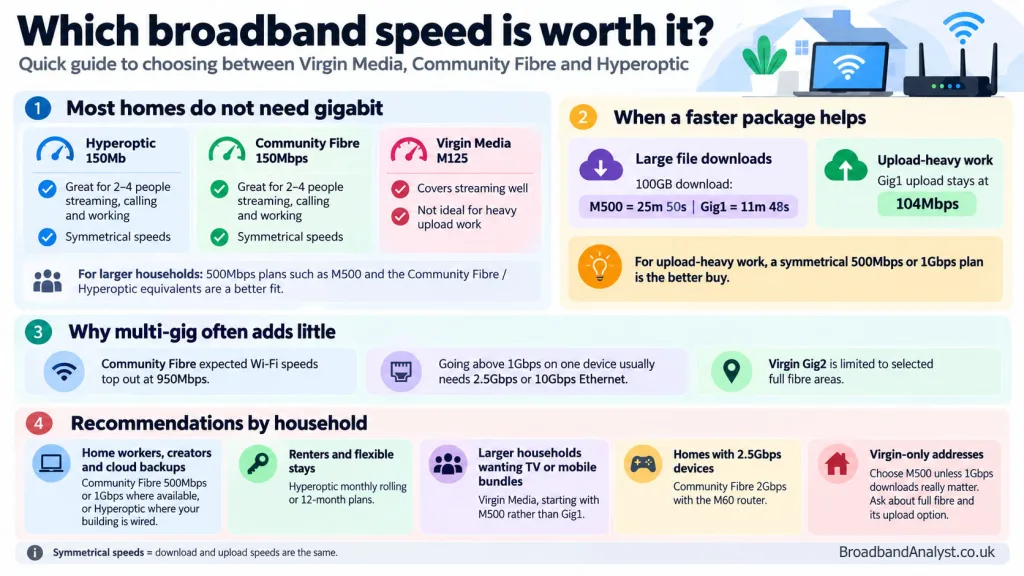
| Around 500Mbps, down / up | 500 / 500Mbps | M500 · 516 / 52Mbps | 500Mb · 527 / 523Mbps |
| Gigabit class, down / up | 1,000 / 1,000Mbps | Gig1 · 1,130 / 104Mbps | 1Gb · 900 / 900Mbps |
| Selected minimum terms | 12 or 24 months, depending on package | 24 months on many advertised deals | Monthly rolling, 12 or 24 months, subject to offer |
| Extra services | Optional streaming TV and home phone on eligible offers | TV, home phone and O2 Volt options, subject to availability | Optional home phone |
Speeds are provider-advertised averages. Hyperoptic’s figures are peak-time averages with one device connected by Ethernet. Check the exact flat number as well as the postcode. Hyperoptic may have wired one building on a street, while Community Fibre has access to another.
Virgin Media O2 reported a full fibre footprint of 9.4 million premises, including nexfibre, in its third-quarter 2026 results. In November it began rolling out Gig2 over cable in 18 UK locations. The cable version averages 2,000Mbps down and 100Mbps up. Gig2 full fibre averages 2,000Mbps down and 200Mbps up as standard, with a 2,000Mbps upload option at eligible addresses. Check which version you’re being offered. Our Virgin Media Gig1 vs Gig2 guide compares the tiers.
Which provider offers better value?
Community Fibre is the first quote to get for broadband only. Compare its 500Mbps or 1Gbps offer with the equivalent Hyperoptic deal over the same term. A sharp introductory discount can put either provider ahead. Count any scheduled April changes, setup charges and the price after the minimum term. Start with the current Community Fibre 500Mbps deal.
Hyperoptic is the better bet if you may move soon. A rolling plan can be cheaper over the months you actually need, even if a two-year deal has a lower monthly rate. Check the notice terms and setup cost. Hyperoptic also has a separate 30-day cancellation policy from activation, with charges for service used. Compare Hyperoptic 150Mb and Hyperoptic 500Mb if you’re happy to commit.
Virgin Media makes the strongest case as a bundle. Compare the whole bill with the cost of buying broadband and TV separately. Count extra TV packs and any O2 plan, which has its own bill and contract. A broadband-only promotion can still be competitive. Check Virgin Media M125, M500 or Gig1 against the other plans at your address.
Use the contract summary to add the charges for every month of the minimum term and any one-off fees. Count vouchers or bill credits only if you qualify and can claim them. If you still have a contract, read our guide to broadband switching credit before counting an offer against your exit fee.
Measured speeds, reliability and gaming ping
Opensignal’s December 2025 London report put Community Fibre first for average download speed at 208.7Mbps and average upload at 164.0Mbps. Hyperoptic averaged 135.8Mbps up and Virgin Media 34.6Mbps up. Community Fibre also led on Reliability Experience, scoring 786 points, compared with 723 for Hyperoptic and 697 for Virgin Media. The report covers users on a mix of packages, and the reliability figures are scores on Opensignal’s scale.
In Broadband Savvy’s 2026 wired ping tests from London to Manchester at peak time, Community Fibre averaged 9.98ms, Hyperoptic 10.52ms and Virgin Media 30.63ms. Those results describe the test locations and the route to Manchester. The server you play on, your home Wi-Fi and other people uploading can all change the ping you see in a game.
For gaming, start with Community Fibre or Hyperoptic where both are available and use Ethernet to the console. If your game lags mainly when somebody sends files, check latency while the connection is busy. Our low-latency broadband guide explains how to make that check.
How long do large downloads and uploads take?
| Package | Download a 100GB game | Upload a 20GB folder |
|---|---|---|
| Community Fibre 500Mbps | 26m 40s | 5m 20s |
| Virgin Media M500 | 25m 50s | 51m 17s |
| Hyperoptic 500Mb | 25m 18s | 5m 6s |
| Community Fibre 1Gbps | 13m 20s | 2m 40s |
| Virgin Media Gig1 | 11m 48s | 25m 38s |
| Hyperoptic 1Gb | 14m 49s | 2m 58s |
Times use advertised wired speeds and decimal GB. Server limits, protocol overhead and Wi-Fi can add time. At around 500Mbps, the game downloads are within a minute and a half of each other. Uploading the same 20GB folder takes about 46 minutes longer on M500 than on either of the other two.
Virgin Media M125 averages 132Mbps down and 20Mbps up. That and Hyperoptic 150Mb, which averages 159Mbps down and 157Mbps up, are enough for ordinary browsing, calls and several streams on a good home network. Several people downloading large files or a household that backs up video regularly have more reason to move to a 500Mbps plan.
Routers, Wi-Fi and wired speeds
| Provider | Equipment to look for | What matters in the home |
|---|---|---|
| Community Fibre | Linksys MX20 Wi-Fi 6 on 100–500Mbps London plans. Linksys M60 dual-band Wi-Fi 7 at 1Gbps through 2.5Gbps Premium. Linksys M62 tri-band Wi-Fi 7 on 5Gbps Premium. | The 2.5Gbps Premium tier advertises 2.3Gbps. A multi-gigabit Ethernet port on both ends is needed for more than 1Gbps on a single wired device. |
| Virgin Media | Wi-Fi 6 Hub 5 on Gig1 cable. Wi-Fi 6 Hub 5x on eligible full fibre installations. | Hub 5 has one 2.5Gbps Ethernet port and three gigabit ports. Hub 5x has one 10Gbps Ethernet port and three gigabit ports. |
| Hyperoptic | The Hyperhub model can vary. Wi-Fi 6 models include the Zyxel EX3301 and ZTE H3600. | The Zyxel has gigabit LAN ports, enough to use a 900Mbps wired plan. Check the supplied model if you need specific Wi-Fi or Ethernet features. |
Community Fibre lists a different router for Surrey and Sussex customers, the Nokia G-2426G-A with Wi-Fi 6. Ask which hub is included at your address before choosing a deal on the strength of its hardware.
A faster package raises the speed available at the hub. If the connection drops upstairs or in a room behind thick walls, Ethernet or a mesh node placed where it still receives a strong signal is a better first step. Hyperoptic’s Total Wi-Fi and Minihub and Virgin’s Wi-Fi Pods are options for those providers. Check the charge and any guarantee exclusions on your quote.
Customer service, installation and switching
In Which?’s January 2026 survey of 5,235 broadband customers, Hyperoptic scored 77%, Community Fibre 72% and Virgin Media 59%. The score combines satisfaction and willingness to recommend. Ofcom’s April–June 2026 figures measured complaints escalated to the regulator and placed Virgin Media among the least complained-about large broadband providers. Use the Which? figures for the direct comparison across these three.
For Community Fibre or Hyperoptic, confirm whether the provider can use an existing socket or needs to run a new cable to the flat. Ask about building or landlord permission if new wiring is needed. Virgin offers QuickStart self-installation at eligible addresses with an existing cable connection. Full fibre installations follow the appointment options on the order.
For a switch at the same address, contact the new provider first. Under One Touch Switch it can arrange the broadband transfer and the old provider should explain any early termination fee. If you want to keep a phone number, ask for the transfer when ordering. Check separately what happens to TV, home phone and any bundle discount.
Questions to check before you order
Is Community Fibre or Hyperoptic the better 1Gb choice?
If both quotes are close and you’re staying put, choose Community Fibre for its 1,000Mbps download and upload and the London Wi-Fi 7 router. Choose Hyperoptic if its shorter term fits better or it is cheaper over the period you expect to stay. The jump from 900Mbps to 1,000Mbps matters little for normal streaming or calls.
Which is best if I also want live sport and TV?
Virgin Media is the strongest bundle option here if you want a full live-TV package and sports add-ons. Price the actual channels you watch. You can also buy broadband from either rival and pay for sports streaming separately. See our Virgin Media broadband and TV bundle guide for the package differences.
Can I access a home server or camera from outside?
Ask about a public IPv4 address before switching if your setup depends on inbound port forwarding. Community Fibre uses carrier-grade NAT by default for customers joining or renewing since June 2026 and offers a public IP add-on. Hyperoptic also uses carrier-grade NAT on its standard IPv4 service and offers a static IP option.