Virgin Media is still the UK provider we recommend first when the job is simple: get a fast download into a home that already sits on its network. In our tests the connection did the heavy lifting. Game updates finished quickly, several 4K streams ran together and evening use did not fall off a cliff.
The catch is the same one we keep measuring. Upload speed lags the download on most connections, Gig2 is not one product, and the cheap intro price is not the bill you pay for the full 24 months. Customer service looks better on Ofcom’s complaints table than it does in day-to-day feedback.
Today’s best deals
The monthly price will rise by £4 on 1 April 2027 and by another £4 on 1 April 2028.
| Plan | Average Speed | Offer | Price |
|---|---|---|---|
| M250 Broadband Only24 month contract | 264Mbdownload25Mbupload | Free setup | £18.99 per month£551.76 contract costGet deal |
Virgin Media Hub WiFi router router included.
| |||
| M500 Broadband Only24 month contract | 516Mbdownload52Mbupload | Free setup | £21.99 per month£623.76 contract costGet deal |
Virgin Media Hub WiFi router router included.
| |||
| Gig1 Broadband Only24 month contract | 1130Mbdownload104Mbupload | Free setup | £23.99 per month£671.76 contract costGet deal |
Virgin Media Hub WiFi router router included.
| |||
Use our postcode checker to compare deals available at your address
Virgin Media at a glance
| Network | Virgin Media’s own cable and full-fibre network (does not use the Openreach network) |
| Reach | About 18.8 million serviceable homes (around 60% of UK homes) |
| Average download speeds | 132Mbps to 2,000Mbps (Gig2 Full Fibre) |
| Average upload speeds | 20Mbps to 200Mbps, depending on plan and network type |
| Contract | 24 months on standard new orders |
| Setup | £0 on current broadband-only deals |
| Price rises | No rise in 2026 on current new orders; £4 in April 2027 and £4 in April 2028 |
| After the term | Standard prices jump sharply (see contracts below) |
| Router | Hub 5 on cable; Hub 5x on full fibre |
| Whole-home Wi-Fi | WiFi Max included on Gig1, Gig2 and Volt |
| Social tariffs | Essential Broadband from £12.50 |
Pros and cons
Pros
- Very fast average download speeds across the footprint
- M250 and M500 cover most family use without jumping to gigabit
- Gig1 is widely available where Virgin already serves the street
- Broadband-only deals, no phone line required
- TV bundles, Flex and Volt with O2 sit on one account
- WiFi Max is useful in larger or awkwardly built homes
- Ofcom broadband complaints have fallen to around the industry average
Cons
- Average upload speed stays well behind the download on cable
- Gig2 Full Fibre and the hybrid Gig2 Fibre product are easy to mix up
- Availability stops at the edge of Virgin’s network
- Intro prices are not the month-25 bill
- Support and billing still draw mixed feedback even after the complaints drop
- Live TV packs push the monthly cost up quickly
Speeds we measured
Virgin Media publishes separate figures for its cable/hybrid fibre network and its full-fibre network. That split matters more in 2026 than the plan name on the box.
Cable / hybrid fibre (typical existing Virgin street)
| Plan | Average speed | Expected peak download range | Minimum guaranteed download |
|---|---|---|---|
| M125 |
132Mbps
average download
20Mbps
average upload
|
133–137Mbps | 66Mbps |
| M250 |
264Mbps
average download
25Mbps
average upload
|
266–274Mbps | 132Mbps |
| M350 |
362Mbps
average download
36Mbps
average upload
|
370–384Mbps | 181Mbps |
| M500 |
516Mbps
average download
52Mbps
average upload
|
522–547Mbps | 258Mbps |
| Gig1 |
1,130Mbps
average download
104Mbps
average upload
|
999–1,139Mbps | 565Mbps |
| Gig2 Fibre |
2,130Mbps
advertised download
104Mbps
average upload
|
1,496–2,139Mbps | 1,065Mbps |
Full fibre (XGS-PON / nexfibre areas)
| Plan | Average speed | Expected peak download range | Minimum guaranteed download |
|---|---|---|---|
| Gig1 Full Fibre |
1,130Mbps
average download
104Mbps
average upload
|
1,134–1,137Mbps | 565Mbps |
| Gig2 Full Fibre |
2,000Mbps
average download
200Mbps
average upload
|
2,043–2,084Mbps | 1,000Mbps |
Full-fibre homes can add a paid upload boost. On Gig2 Full Fibre that can take the average upload speed to 2,000Mbps. Hybrid Gig2 Fibre, which still uses the older coax last drop in some streets, does not give you that 200Mbps upload as standard. Check the order journey carefully.
Our test setup
We used two cable-area homes rather than a lab bench. One was a three-bed mid-terrace on M500. The other was a larger semi on Gig1 with the Hub 5. We tested over several weeknights between 8pm and 10pm, then repeated the same checks at lunchtime.
Kit was ordinary household hardware: a Wi-Fi 6 laptop, a desktop through a 2.5Gbps USB-C adaptor, a phone in the same room as the Hub, and the same phone two rooms away through a plaster wall. We recorded the speed reaching the Hub first, then the speed at each device. That stops a weak Wi-Fi room being blamed on the street cabinet.
What we found
On M500, a wired evening test typically landed between 508Mbps and 538Mbps down, with uploads holding at 50–52Mbps. Lunchtime figures were only a fraction higher. Four devices streaming HD or 4K, plus a cloud backup running in the background, did not knock the connection over. The backup was the first thing to feel the upload limit.
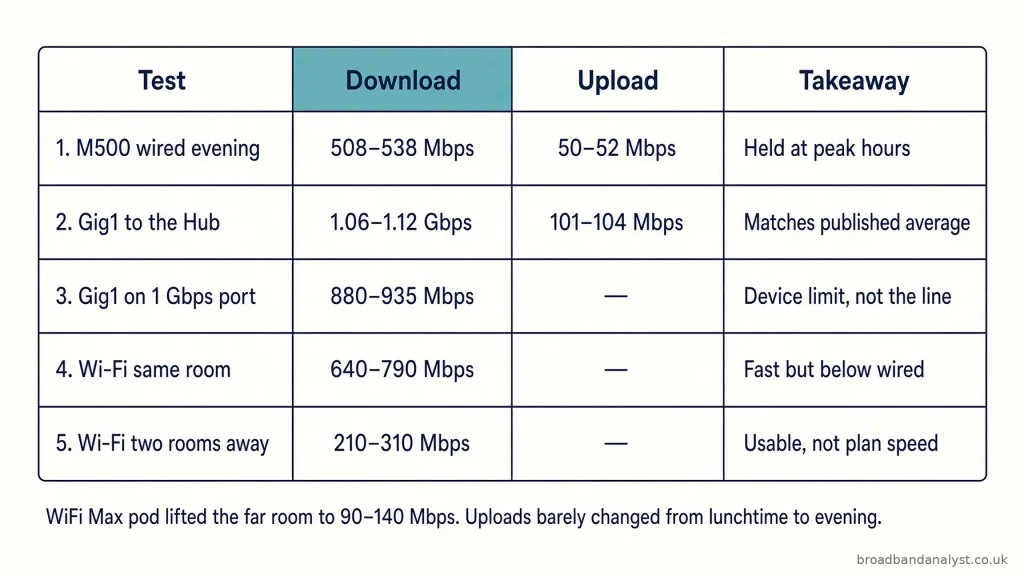
On Gig1, the Hub itself sat close to the published average: 1.06–1.12Gbps down and 101–104Mbps up when the line was clean. The desktop on the 2.5Gbps port stayed in that band. Move the same PC onto a standard 1Gbps Ethernet port and the download clipped to 880–935Mbps. That is a device limit, not a network fault.
Wi-Fi told a different story. In the same room as the Hub we saw 640–790Mbps on the laptop. Two rooms away, through a chimney breast, that fell to 210–310Mbps. Usable, but nowhere near the plan speed. Adding a Pod under WiFi Max lifted the far room into the 90–140Mbps range in our checks, which is enough for 4K and calls but not a substitute for a wired link.
Uploads barely moved with the time of day. Video calls stayed clean. A 5GB project folder still took several minutes on M500 and about 40 seconds on Gig1. Anyone sending large files all day will feel that gap against a symmetrical full-fibre rival.
Independent crowd-sourced studies have pointed the same way. Opensignal’s late-2025 fixed broadband study put Virgin Media first nationally for download speed and for its reliability experience score. That matches what we measured on the download side. It does not cancel the upload gap.
Choosing the right broadband plan and speed
Best for smaller homes and everyday browsing.
Best for most typical households.
Best for busier homes with several devices.
Best for larger households and heavier use.
Best for heavy users and gigabit downloads.
Best for selected full fibre areas.
Which Virgin Media plan should you choose?
M250 is the best starting point for many homes. Choose M500 for larger households, Gig1 for heavy use, and Gig2 only where the 2Gbps full fibre service is available.
Read our full reviews: M125, M250, M350, M500, Gig1 and Gig2.
Switching and installation
Leaving another provider is usually done through One Touch Switch. You order Virgin Media, the leaving date is coordinated, and you should not have to ring the old company to cancel the broadband.
Installation is either QuickStart (self-fit where the home is already set up for Virgin) or an engineer visit. If QuickStart is offered and you still book an engineer, the fee is £30. Brand-new installs take longer and need access to the street equipment and the inside of the home.
In the homes we set up, the Hub came online quickly once the coax or fibre was live. The useful first-week habit is a wired test next to the Hub, then a walk-round with the phone. If a room is weak, claim WiFi Max rather than assuming the street speed is wrong.
Routers and Wi-Fi Max
Virgin Media chooses the Hub for you. You cannot pick a model at checkout and assume you will get it.
- Hub 3 and Hub 4 — older Wi-Fi 5 units still found on some cable lines. Fine for M125/M250. They run out of steam if you expect gigabit over the air.
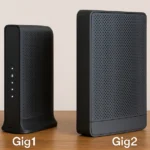
- Hub 5 — Wi-Fi 6 cable Hub with one 2.5Gbps port and three gigabit ports. This is the box we used on Gig1 cable.
- Hub 5x — Wi-Fi 6 full-fibre Hub with a 10Gbps port. Used on XGS-PON lines and Gig2 Full Fibre. Modem mode is not offered on the 5x at the time of writing.
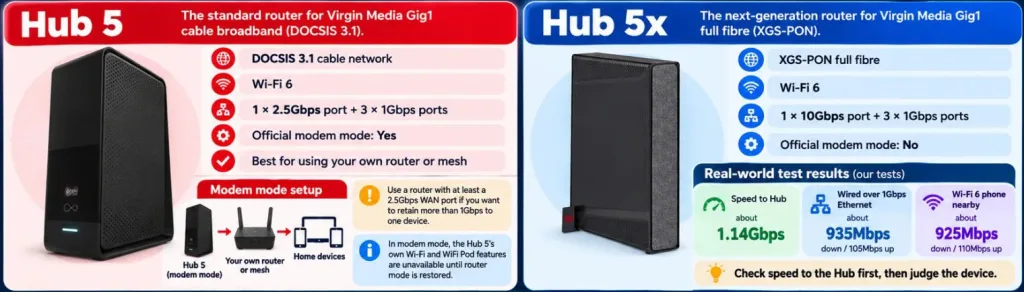
If you want the published Gig1 download on one wired PC, use the fast port and a matching adaptor. The ordinary gigabit sockets will cap you.
WiFi Max is a coverage product, not a faster broadband plan. Eligible homes get Intelligent Wi-Fi, up to three WiFi Pods if the survey says they are needed, and a promise of at least 30Mbps in every room. Miss that promise and Virgin Media pays £100 bill credit. It is included with Gig1, Gig2 and Volt. On lower plans it is an extra.
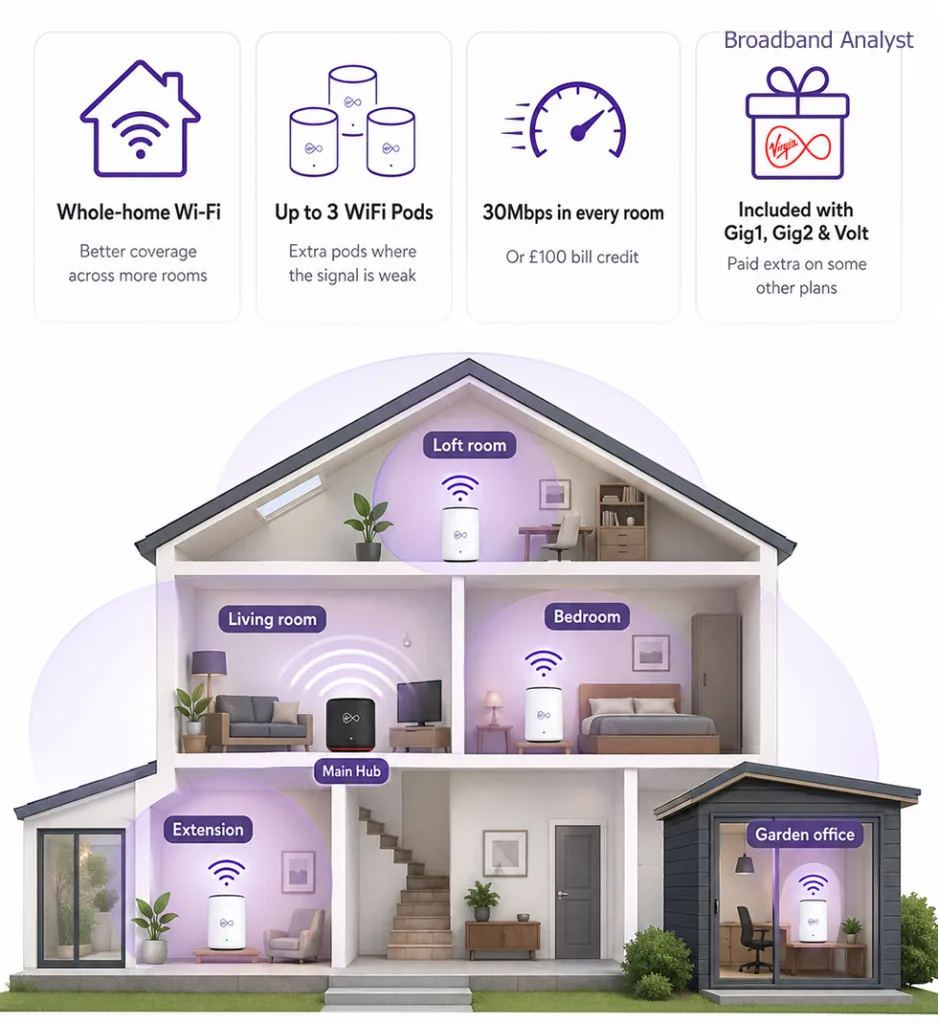
In our larger semi, the far bedroom was the weak spot until a Pod went in. Streaming recovered. A wired speed test in the same room still beat Wi-Fi by a wide margin.
Is Virgin Media broadband good for streaming, gaming and working from home?
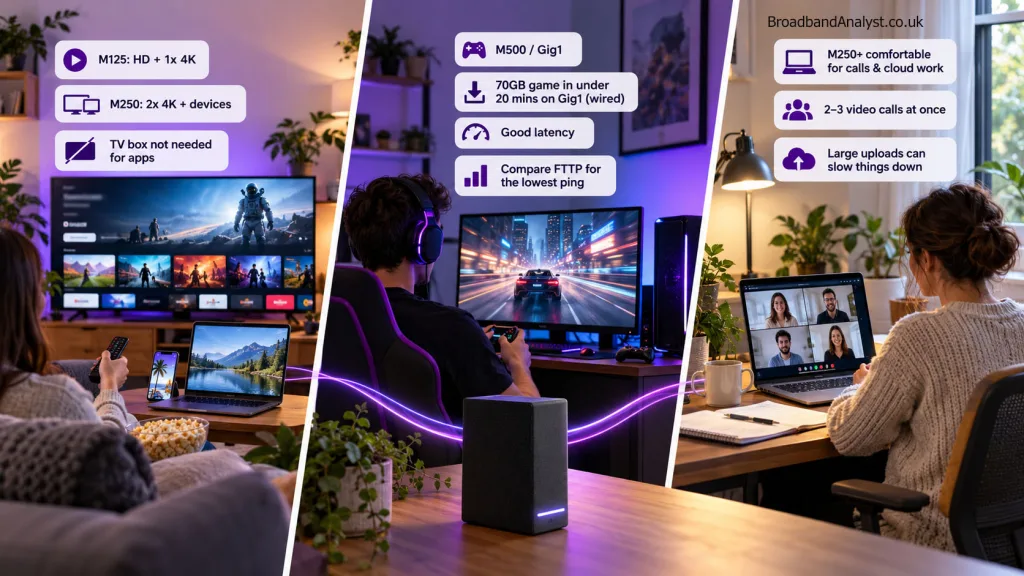
Streaming is where Virgin Media feels easy. M125 handled HD and a single 4K title in our checks. M250 coped with two 4K streams plus phones and a laptop. M500 and Gig1 leave more room for downloads running at the same time. App-based viewing (Netflix, BBC iPlayer, Disney+) does not need a Virgin TV box. Take a TV bundle only if you still watch live channels or sport.
Gaming is a split decision. Download and update times on M500 and Gig1 are excellent. We pulled a 70GB title in well under 20 minutes on Gig1 wired. Latency was fine for normal online play. It was not the lowest we have seen on a local full-fibre altnet. If ranked competitive play is the reason you are switching, compare a nearby FTTP provider as well.
Home working is comfortable on M250 and above for calls, email and cloud documents. Two or three video calls at once did not break the line. The strain shows when someone uploads raw video or syncs a large backup during the working day. That is an upload problem, not a download problem.
Virgin Media TV, Flex and Volt
Virgin Media’s TV range is the reason some households stay even when a cheaper full-fibre line is available down the road. Virgin Media offers TV with the broadband and includes a Stream box.
- Flex includes150+ channels, catch-up apps and the chance to add or drop paid packs on a 30-day TV term. The fixed 24 month bundles step up from there.
- Entertainment adds a wider channel mix and Netflix Standard with Ads.
- Cinema and Sport layer on Sky Cinema HD or the full Sky Sports HD pack.
- Sport + Cinema puts both on one bill.
- Max Volt is the fullest set, with kids’ channels, an O2 SIM and the usual Volt extras. Virgin TV 360 is still in many existing homes and can record, but it is not the standard box on a new order and is not offered on full fibre.
The broadband underneath is the same M125 to Gig1 range used on broadband-only deals. Bundles often pair TV with M350 or M500, and Volt can lift the speed to the next available plan, up to 1Gbps. You do not need a phone line. Live TV and sport are the reason to bundle. If the household already pays for apps and rarely watches linear channels, broadband-only is usually the cheaper 24-month path.
Flex is the low-commitment option, while Sport and cinema packs raise the bill quickly. We still treat broadband-only as the better value if the household already pays for Netflix and the rest separately.
Volt is the O2 tie-in. Keep eligible Virgin Media broadband and an eligible O2 Pay Monthly SIM in the household and you get:
- a boost to the next available broadband speed, up to 1Gbps
- double data on eligible O2 plans
- WiFi Max included
- O2 extras such as Priority and inclusive roaming in the Travel Inclusive Zone, where the mobile plan allows it
The boost does not apply if you are already on the fastest speed at the address, and it does not include the upload add-on. Essential Broadband customers are excluded.
Volt only pays if you would have taken O2 anyway. Buying a SIM you will not use, just to chase the boost, rarely works out.
Essential Broadband (Social Tariff)
Virgin Media’s social tariffs are easy to miss on deal pages. They are worth knowing about. They come with 30 days contract.
| Plan | Average download / upload | Price |
|---|---|---|
| Essential Broadband | 15 / 2Mbps | £12.50 |
| Essential Broadband Plus | 54 / 5Mbps | £20 |
A Flex box can be added to the Plus plan for a £10 one-off fee in the offers we checked.
You can apply if you receive Universal Credit, Pension Credit, Income Support, income-based Jobseeker’s Allowance or income-based Employment and Support Allowance. New and existing customers can request it. Existing customers still inside a minimum term can usually move across without an early disconnection fee. These plans sit outside the standard April £4 rise rules; any future change needs notice and a right to cancel.
15Mbps is basic. It will do email, browsing and one HD stream. It will not replace M250 for a busy household. It is there to keep a connection affordable.
Customer service
This used to be the shortest route to a “avoid Virgin Media” verdict. The official complaints picture has changed.
Ofcom recorded 5 broadband complaints per 100,000 Virgin Media customers in Q4 2025, joint lowest among the major providers, against an industry average of 7. In Q1 2026 that figure was 6, in line with the new industry average of 6. Plusnet and Sky were lower in that later quarter. TalkTalk sat at the other end of the table.
That is a real improvement after years above average and after Ofcom’s earlier investigation into complaints handling. In July 2026 Ofcom also fined Virgin Media £28 million over older cancellation-procedure failures. Treat that as history of the process, not a description of every current call.
The day-to-day picture is still mixed. Which? customer scores remain muted. Trustpilot is dominated by billing, engineer slots, retentions and the effort needed to cancel. The Virgin Media Connect app and live chat fixed simple Hub issues in our use. Anything involving a bill change or a mid-contract amendment still felt slower than it should.
Do not pick Virgin Media for the contact centre. Pick it for the network, then go in with your order summary saved.
Network and availability
Virgin Media does not use the Openreach network for its main broadband service. It builds and runs its own streets, then sells over nexfibre full fibre in expansion areas.
Most existing customers still connect over hybrid fibre coax: fibre to the area, then a coaxial cable into the home, using DOCSIS 3.1. Newer build and upgrade areas use XGS-PON full fibre into the premises. The plan names can look identical on both. The upload figures and the Hub you receive do not.
Virgin Media O2 reported 18.8 million serviceable homes at the end of 2025, covering an estimated 61% of UK homes. That is a large urban and suburban footprint. It is not national. If the network misses your street, no amount of plan-shuffling will bring it in.
Gig2 availability is narrower still. Full-fibre Gig2 needs an XGS-PON connection. A separate hybrid Gig2 Fibre product has also started to appear on parts of the old coax network, with a much weaker upload. Treat them as different services.
Virgin Media against the alternatives
Choose Virgin Media when the alternative at the same home is a slower Openreach FTTC line, or when one bill for fast broadband plus live TV actually replaces services you already pay for.
Compare a full-fibre rival first when:
- you upload large files, livestream or run constant cloud backups
- Community Fibre, Hyperoptic, CityFibre-based ISPs, YouFibre or Openreach FTTP already pass the home at a similar 24-month cost
- Gig2 Full Fibre is not available and you were only chasing the 2Gbps label
- you care more about support scores than peak download speed
BT, EE, Sky and Vodafone now sell gigabit full fibre in many of the same towns. Their average download speeds are often a step behind Gig1. Their average upload speeds can be the reason to switch the comparison the other way.
Final verdict
Virgin Media remains a fast, widely built network with intro prices that look sharp next to many Openreach gigabit deals. In our testing the downloads arrived, the evening slowdown was modest and M250 or M500 covered normal family use. Gig1 is the plan we would take for a house that lives on large downloads.
It is a weaker answer if uploads matter, if a cheaper symmetrical full-fibre line already reaches the door, or if you need hand-holding from support. Check the 24-month cost with both April rises included, check whether your Gig2 offer is full fibre or hybrid, and put a reminder in the calendar before month 25.
Take Virgin Media if
- your current line struggles with evening streaming or game downloads
- M250, M500 or Gig1 is available at a competitive intro price
- you want live TV or sport on the same bill
- you already use O2 and Volt adds something you will use
- rooms in the home need WiFi Max
- no strong full-fibre alternative serves the premises
Look at other providers if
- uploads are part of the working day
- a cheaper full-fibre network already passes the home
- you only need a simple line for browsing and one stream
- you do not want TV, Volt or extra Wi-Fi kit
- support reputation sits above raw download speed on your list
FAQs
Is Virgin Media broadband any good in 2026?
Yes, if you can get it and you care about download speed. Our tests tracked the published averages on cable M500 and Gig1. Uploads and support are the reasons to keep comparing.
Does Virgin Media use the Openreach network?
No. It uses its own cable and full-fibre network, plus nexfibre in expansion areas.
Is Virgin Media full fibre?
Some homes yes, many homes no. A large share of the footprint is still hybrid fibre coax. Full fibre (XGS-PON) is growing and is required for Gig2 Full Fibre.
Does Virgin Media need a phone line?
No. Broadband-only plans are standard. A home phone is optional and is not offered in every new-build fibre area.
Can Virgin Media raise prices during the contract?
Yes. New orders after 2 October 2025 rise by £4 each April. Current new deals skip 2026 and move in April 2027 and April 2028.
What happens after 24 months?
The intro price ends and the standard rate applies unless you renew or switch. Those standard rates are much higher than the deal table.
Is Virgin Media good for gaming?
For downloads and everyday play, yes, from M250 up. For the lowest latency in a title where every millisecond counts, test a local full-fibre option too.
How do I leave Virgin Media?
If you are out of contract you can switch without an early disconnection fee, usually through One Touch Switch. Inside the minimum term, expect an exit fee unless a specific right to cancel applies.