Summary
- BT and EE will remove Netflix access on two older TV boxes from 4 March 2026.
- The change affects the TV Recordable Box (G4) and TV Box (Z4).
- Netflix is updating its app, and the new version will no longer run on this older hardware.
- Newer EE TV boxes, including the 4K Recordable Box (G5), will still have Netflix available.
- Customers can keep their Netflix membership and watch on other compatible devices, or move to a newer TV box.
- If you upgrade your BT/EE TV box, recordings saved on the current box will not transfer to the new one.
BT (including EE) has confirmed that Netflix will no longer work on some of its older pay TV set-top boxes from 4 March 2026. The provider has flagged two affected models: the TV Recordable Box (G4) and the TV Box (Z4).
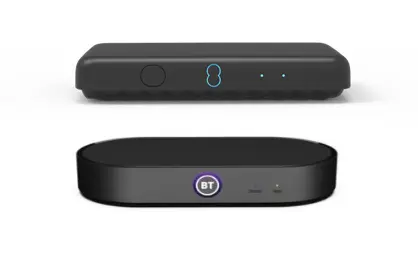
If you use one of these boxes to open the Netflix app on your TV, you will need another way to watch Netflix after the cut-off date.
Which TV boxes lose Netflix
BT/EE has named the specific hardware that will lose Netflix access:
- TV Recordable Box (G4)
- TV Box (Z4)
The change only applies to these older models, based on the provider’s notice.
Why the Netflix app is being removed
BT/EE says Netflix is changing its app to improve the experience, but the updated version will no longer be compatible with the G4 and Z4 boxes. Once Netflix rolls out the change, those boxes will not be able to run the Netflix app.
This type of change is usually linked to newer app requirements, such as updated security, video playback features, or performance needs that older devices cannot meet.
Which BT/EE TV boxes keep Netflix
BT/EE has indicated that newer devices will continue to offer Netflix. The provider specifically referenced that other EE TV boxes, including the 4K Recordable Box (G5), will still have Netflix available.
If you are not sure which model you have, check the box model in your TV settings or on the label on the underside of the set-top box.
What customers can do next
If you want to keep watching Netflix on your TV, you have two main options:
- Switch to a newer BT/EE TV box
BT/EE is pointing affected customers towards upgrading to a newer TV box so they can keep Netflix available through the set-top box. - Use another compatible device
Your Netflix membership stays the same. You can continue watching on devices that Netflix still runs on, such as a smart TV app, a streaming stick, a games console, a phone, tablet, or laptop.
BT/EE has also highlighted an important limitation for people changing TV boxes: any shows or films recorded and stored on your current box will not appear on the replacement box.
If you have recordings you still want to watch, plan ahead so you can finish them before you swap hardware.
BT TV and EE TV packages explained
BT’s TV service now comes under the EE TV name, even when you order through BT. It’s only available as part of a broadband bundle, and you can choose from five monthly packages: Entertainment, Sport, Big Entertainment, Big Sport and Full Works. Entertainment and Big Entertainment include Netflix Standard with adverts, while Full Works includes Netflix Standard. If you go for Sport or Big Sport, Netflix can be added separately for an extra monthly cost.
BT and EE currently offer their latest set-top boxes with all TV packages. These include the EE TV Box Pro, which provides recording features, and the smaller EE TV Box Edge. The box supplied depends on your package and how you plan to watch. This is relevant in light of the recent Netflix removal announcement, as the older G4 and Z4 boxes will lose Netflix access from 4 March 2026.
For more on how broadband and TV bundles compare, you can explore our full reviews: the current BT Broadband review, our BT Broadband and TV deals, and our EE Broadband review.
BT TV and EE TV now offer a similar viewing experience, with the same range of packages, add-ons and box features across both brands. The main difference lies in how the service is ordered and managed. BT broadband customers typically add TV through BT and manage it via their My BT account. EE broadband customers do the same through EE, using the My EE portal. While the product itself is consistent, billing, customer offers and upgrade routes can vary slightly depending on whether you’re with BT or EE.