Virgin Media Student Broadband – Deals & Contracts Explained
Virgin Media offers dedicated broadband packages specifically designed for students across the UK. As one of the country’s largest broadband providers, Virgin Media operates its own cable network infrastructure rather than using the Openreach network, which means it can deliver ultrafast speeds in areas where its network is available.
For students, having reliable broadband is no longer a luxury but an absolute necessity. From attending online lectures and submitting coursework to streaming entertainment and staying connected with family, your internet connection forms the backbone of university life. Virgin Media recognises these needs and tailors its student offerings accordingly, combining competitive packages with flexible contract options that align with academic schedules.
The provider’s student-specific deals typically include benefits like waived setup fees, promotional vouchers, and access to their fastest speeds at student-friendly terms. What sets Virgin Media apart is its unique cable infrastructure, which can handle multiple devices simultaneously without the performance degradation often seen on other networks during peak hours.
Eligibility & Requirements
Virgin Media’s student broadband deals come with specific eligibility criteria that you’ll need to meet before signing up. The primary requirement is proof of student status through a valid ac.uk email address. This email must be active and accessible, as Virgin Media uses it to verify your enrollment at a recognised UK educational institution.
Coverage is another crucial consideration. Virgin Media’s cable network doesn’t reach every postcode in the UK, so you’ll need to check availability at your student accommodation address before getting excited about any particular package. The provider’s online availability checker gives instant results when you enter your postcode, showing which packages are accessible at your location.
If you’re living in student halls or university-managed accommodation, you’ll need to check whether Virgin Media installations are permitted. Some accommodation providers have exclusive agreements with specific broadband companies or include internet access as part of the rent. Always verify with your landlord or accommodation office before committing to any broadband contract.
Age restrictions apply as well. You must be at least 18 years old to enter into a broadband contract with Virgin Media. The named account holder will be responsible for all payments and contract obligations, which is particularly important when sharing accommodation with housemates.
Available Student Packages for 2025
Virgin Media structures its student broadband offerings around five main packages, each delivering different speeds to suit various household sizes and usage patterns.
The M125 package offers average speeds of 132Mbps download and 20Mbps upload. This entry-level option suits smaller households with two to three students who primarily use the internet for web browsing, social media, streaming on one or two devices simultaneously, and attending online lectures. While it’s the most affordable option, households with multiple heavy users might find the speeds limiting during peak usage times.
Moving up, the M250 package delivers average speeds of 264Mbps download and 25Mbps upload. This mid-range option handles larger households of three to four students more comfortably. You’ll notice better performance when multiple people are streaming in HD, gaming online, or downloading large files simultaneously. The doubled upload speed compared to M125 makes video calls and uploading coursework significantly smoother.
The M350 package offers average speeds of 362Mbps download with 36Mbps upload. This package bridges the gap between standard broadband and ultrafast services. It’s ideal for households of four to five students, particularly if one or more housemates are serious gamers or regularly work with large files. The additional bandwidth ensures that one person’s activities don’t impact others’ internet experience.
For larger student houses or those with demanding internet requirements, the M500 package provides average speeds of 516Mbps download and 52Mbps upload. This substantial speed boost accommodates five to six students using the internet simultaneously. The fully 52Mbps upload speed is particularly beneficial for students in creative fields who need to upload video projects, large design files, or participate in high-quality video conferences.
At the top end, Virgin Media’s Gig1 package delivers average speeds of 1,130Mbps (1.13Gbps) download and 104Mbps upload. This ultrafast option is excessive for most student households but makes sense for larger houses of six or more students, particularly if several housemates are gamers, content creators, or need to work from home with professional-grade connectivity.
All packages include unlimited data usage, meaning there are no caps on how much you can download or upload each month. This is crucial for students who might binge-watch series during exam revision breaks or download large academic resources throughout the term.
Contract lengths come in two flavours: standard 12 month contracts and flexible 30 day rolling contracts. The rolling contracts offer particular appeal to students who might only need broadband for an academic year or want the flexibility to cancel without penalties if circumstances change.
Understanding Contract Options
Choosing between Virgin Media’s contract types requires careful consideration of your specific situation and how long you’ll need the service.
Virgin Media student broadband comes with 12 month contracts. These contracts typically come with the best promotional rates and additional incentives like restaurant vouchers or streaming service subscriptions. The commitment runs for a year and a half, which covers most of a two-year degree or the majority of a three-year course if you sign up in your first year.
However, the 12 month commitment does present challenges for students. If you finish your degree, move to different accommodation, or need to return home unexpectedly, you’re still bound by the contract terms. Early exit fees can apply, though Virgin Media sometimes waives these in exceptional circumstances.
The 30-day rolling contract offers maximum flexibility. After an initial 30-day period, you can cancel anytime with just 30 days’ notice. This flexibility is perfect for students who are uncertain about their living arrangements beyond the current academic year or those in their final year who’ll leave university before an 18-month contract would expire.
Rolling contracts typically cost slightly more per month than their 18-month equivalents, but the difference often proves worthwhile when you factor in the flexibility value. There are no early exit fees on rolling contracts, making them a safer bet if your future accommodation plans remain uncertain.
When your contract ends, Virgin Media typically continues your service on a rolling monthly basis at their current standard rates. These post-contract rates are usually higher than promotional prices, so it’s worth contacting Virgin Media before your contract expires to negotiate a new deal or switch to a rolling contract if you prefer.
For students sharing accommodation, it’s crucial to decide who’ll be the named account holder. This person bears legal responsibility for payments and contract obligations. Having clear agreements with housemates about payment contributions before signing up prevents disputes later.
Installation Process Explained
Virgin Media offers two installation routes: QuickStart self-installation and professional engineer installation. Understanding both helps you choose the right option and prepare accordingly.
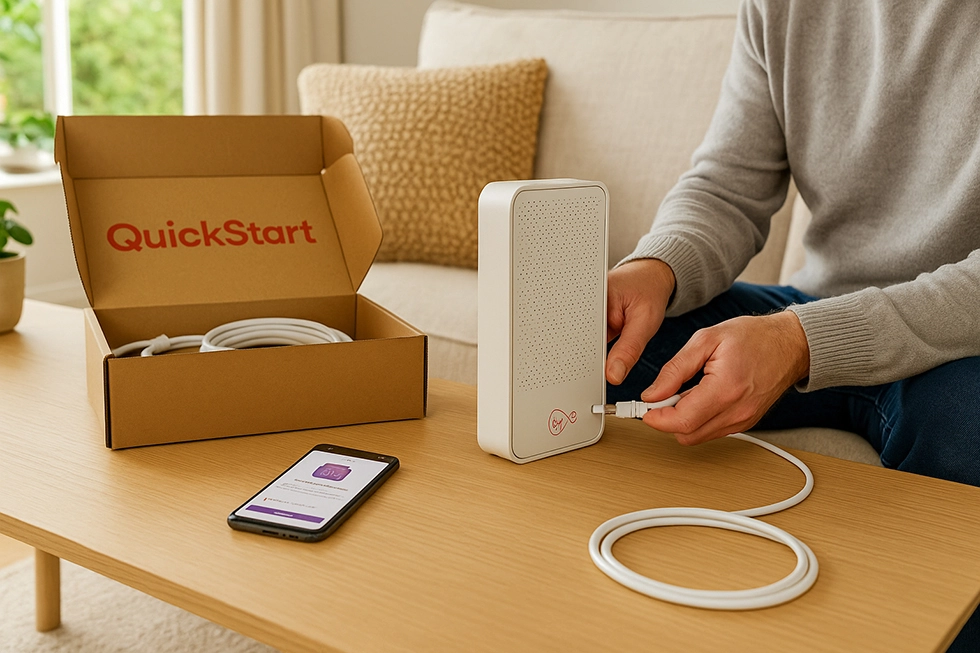
QuickStart self-installation is available at many addresses where Virgin Media infrastructure already exists. This option suits most students as it’s faster, often available within days of ordering, and involves no engineer visit costs. Virgin Media sends you a QuickStart kit containing everything you need: the Hub router, cables, and clear instructions.
You can choose home delivery or Click & Collect from selected Sainsbury’s stores. Click & Collect is particularly useful if you’re moving into accommodation on a specific date and want to ensure the equipment is ready when you arrive.
The self-installation process is straightforward. You’ll need to locate the Virgin Media cable point in your property—this is usually a wall socket with a distinctive threaded connector. Connect the coaxial cable from this point to your Hub, plug in the power, and wait for the lights to indicate a successful connection. The entire process typically takes 30 minutes to an hour and a half, depending on your confidence with technology and how easily you locate the cable point.
If you encounter issues during self-installation, Virgin Media’s QuickStart helpline provides dedicated support. Common problems include not finding the cable point, connections not securing properly, or the Hub failing to establish an internet connection. Most issues resolve quickly with phone support.
Engineer installation becomes necessary when your property lacks existing Virgin Media infrastructure or when the cable point needs repair or relocation. The engineer will drill through external walls to bring the cable into your property, install the wall plate, and set up your Hub. This process is more involved but ensures everything is correctly configured.
Engineer appointments need booking in advance, with installation dates often several weeks away during busy periods like September when thousands of students move into new accommodation. The appointment typically lasts one to two hours, and you’ll need to be present throughout.
Virgin Media charges an installation fee if QuickStart is available at your address but you choose engineer installation instead. However, if engineer installation is the only option available, this cost is typically waived.
Before installation day, prepare your accommodation by identifying where you want the Hub located. Consider factors like central positioning for WiFi coverage, proximity to devices you’ll connect via ethernet cable, and avoiding placement near thick walls or large metal objects that interfere with wireless signals.
If you’re in rented accommodation, always get landlord permission before booking engineer installation, as it involves drilling through walls. Most landlords agree readily, but a few properties—particularly period buildings or those with restrictive clauses—may prohibit such modifications.
Choosing the Right Package for Your Needs
Selecting the appropriate Virgin Media package requires honest assessment of your household’s internet usage patterns and the number of people sharing the connection.
Start by counting devices. Modern students typically have smartphones, laptops, tablets, gaming consoles, and smart speakers—easily five or more devices per person. A household of three students might have 15 devices regularly connecting to WiFi, though not all simultaneously.
Consider usage intensity. Light users primarily browse social media, check emails, and occasionally stream standard-definition content. Moderate users regularly stream HD video, attend video lectures, and download academic materials. Heavy users game online, stream 4K content, upload videos, or participate in multiple simultaneous video calls.
For two-person households, M125 suffices if both residents are light users, but M250 offers better headroom if one or both regularly stream HD content or game online. The frustration of buffering during crucial moments isn’t worth the modest savings.
Three to four-person households should consider M250 as the minimum, with M350 being the comfortable choice if multiple residents game, stream, or work from home simultaneously. Remember that everyone typically uses the internet most heavily during evening hours—exactly when performance matters most.
Five to six-person households benefit significantly from M500 or even Gig1. The increased bandwidth prevents the common scenario where one person’s large download grinds everyone else’s connection to a crawl. The enhanced upload speeds also matter more with additional users making video calls or uploading content.
Gaming deserves special mention. While game downloads benefit from faster packages, actual gameplay requires consistent low latency more than raw speed. Virgin Media’s cable network generally delivers excellent latency, but M350 or above ensures that simultaneous usage by housemates doesn’t introduce lag during competitive gaming sessions.
Budget naturally plays a role. Splitting costs among housemates makes faster packages affordable. If M500 costs moderately more than M350 when divided by five people, the per-person difference might be negligible compared to the quality-of-life improvement.
Think about peak times. University students often have similar schedules—attending lectures during the day, returning home in the late afternoon, and spending evenings online. This synchronised usage means your household’s peak demand occurs when everyone’s home simultaneously, not spread throughout the day like many family households.
Volt Benefits: Virgin Media and O2 Combined
Virgin Media’s Volt benefits represent a unique advantage resulting from O2’s ownership of Virgin Media. If anyone in your household has an O2 mobile contract, your entire household can access Volt benefits on your Virgin Media broadband.
The primary Volt benefit is a speed boost to the next package level at no additional cost. If you order M250, Volt automatically upgrades you to M350 speeds. M350 becomes M500. M500 jumps to Gig1. This upgrade happens automatically when you activate Volt, with the faster speeds appearing within hours.
O2 mobile customers also receive double data on their phone contracts when they activate Volt. This benefit applies to most O2 pay monthly plans and significantly increases the value of your mobile contract. For students who rely heavily on mobile data between lectures or during commutes, this doubling can eliminate concerns about exceeding allowances.
Volt includes Virgin Media’s WiFi Guarantee, providing up to three WiFi Pods at no additional cost if you experience poor coverage in parts of your home. These Pods extend your wireless network into areas where the main Hub’s signal struggles to reach effectively.
O2 customers on certain plans also gain access to O2 Travel Inclusive Zone, allowing them to use their regular phone allowances in 75 destinations worldwide without additional charges. For international students who travel home during holidays or UK students exploring Europe during breaks, this removes the anxiety and expense of international roaming charges.
Activating Volt requires one household member to have an eligible O2 mobile contract. They’ll need to link their O2 mobile account with the Virgin Media broadband account through the My Virgin Media or My O2 apps. The process takes minutes and benefits activate quickly thereafter.
The household eligibility aspect deserves emphasis—you don’t need to be both the broadband account holder and the O2 customer. If your housemate has O2, they can link their account to the household broadband, and everyone benefits from the speed boost. This makes Volt particularly valuable in student houses where coordinating services across multiple residents can create unexpected advantages.
Setting Up Your Service
Once your Hub arrives and you’ve completed installation, proper setup ensures you get the best performance from your Virgin Media connection.
Router placement significantly impacts WiFi performance. Position your Hub centrally if possible, ideally on a table or shelf rather than on the floor or inside a cupboard. Avoid placing it near thick walls, large metal objects, fish tanks, or microwaves—all of which interfere with wireless signals. If your accommodation layout makes central placement impossible, elevated positioning near the area of heaviest use represents a reasonable compromise.
Connect devices strategically. Equipment that remains stationary and requires consistent high bandwidth—like gaming consoles, smart TVs, or desktop computers—should connect via ethernet cable when possible. This frees wireless bandwidth for mobile devices and ensures your most demanding applications get reliable connections unaffected by WiFi interference.
Secure your WiFi network immediately. The Hub arrives with default security enabled, but you should change the WiFi password to something memorable yet secure. Avoid obvious passwords like your address or birthdate. The Virgin Media Connect app makes changing network settings straightforward and guides you through the security configuration process.
Name your network something identifiable but not revealing personal information. “StudentHouse42” works better than “John_Smith_123_High_Street.” If your building has multiple Virgin Media networks nearby, a distinctive name helps you identify your network easily.
The Virgin Media Connect app becomes your primary tool for managing your network. It displays connected devices, runs speed tests, controls parental filters if needed, and manages guest networks. Creating a guest network allows visitors to access your internet without sharing your main network password—a useful feature when hosting friends.
Test your speeds once everything’s running. Virgin Media’s own speed test tool (accessible through their website) or independent testers like Ookla’s Speedtest.net show whether you’re receiving the speeds you’re paying for. Run tests at different times of day to understand performance variations. Some speed reduction during peak evening hours is normal, but consistent significant underperformance warrants contacting support.
Configure quality of service settings if your Hub supports them. These settings prioritise certain types of traffic—ensuring video calls don’t lag even when someone’s downloading a massive file simultaneously. Not all Virgin Media Hubs offer extensive quality of service controls, but basic prioritisation options appear in newer models.
Managing Your Account
Virgin Media provides multiple tools for managing your broadband service, with the My Virgin Media app being your primary interface for most tasks.
The app and online portal allow you to check your monthly usage (though with unlimited data this is largely informational), view and pay bills, update contact details, report faults, and schedule engineer visits if needed. You can also upgrade or downgrade your package, though contract terms and potential charges apply to changes.
Billing cycles run monthly, with payment typically due on the same date each month. Set up a Direct Debit for convenience and to avoid missed payments, which can incur late fees and potentially impact your credit score. Students should ensure sufficient funds are available on payment dates, particularly during holiday periods when income might fluctuate.
The app shows your upcoming bills several days before payment is due, allowing time to address any unexpected charges or query billing issues. Common causes of unexpected charges include one-time installation fees, mid-contract package changes, or additional services like pay-per-view content if you also have Virgin Media TV services.
You can update your contact information through the app whenever you need to. This matters particularly for students who might need to change their delivery address during holidays or update the email address Virgin Media uses for important communications. Keeping contact details current ensures you receive notifications about service outages, maintenance windows, or contract renewal opportunities.
Package management within the app lets you explore upgrade options and see current promotional offers. Virgin Media often runs deals for existing customers, though these rarely match the attractiveness of new customer promotions. Still, checking periodically—especially as your contract end date approaches—might reveal opportunities to upgrade at reasonable costs.
Troubleshooting Common Issues
Even with Virgin Media’s reliable network, occasional issues can disrupt your service. Understanding common problems and solutions saves frustration and often resolves issues without waiting for support.
Slow speeds represent the most common complaint. Before assuming a fault, verify what you’re experiencing against what you’re paying for. M250 should deliver around 264Mbps in ideal conditions, but various factors affect real-world performance. WiFi connections rarely achieve the same speeds as wired ethernet connections. Testing speed via ethernet cable to your Hub establishes whether the incoming service is performing correctly or whether WiFi coverage causes the slowdown.
Distance from your Hub significantly impacts WiFi speeds. The further away you are, and the more walls the signal must penetrate, the slower your connection becomes. If you’re in a different room from the Hub, especially with multiple walls between you, consider either moving closer for bandwidth-intensive tasks or requesting WiFi Pods through Virgin Media’s WiFi Guarantee programme.
Too many connected devices can overwhelm your network, particularly on slower packages. Each connected device consumes some bandwidth even when idle, and active devices sharing available bandwidth means less for each one. Disconnecting devices you’re not actively using—like that gaming console that’s on standby or the smart speaker in the room nobody’s in—frees resources for devices you need.
Connection dropping frequently often indicates interference issues or Hub problems. Restart your Hub by unplugging it, waiting 30 seconds, and plugging it back in. This simple step resolves many connection issues as it clears the Hub’s memory and re-establishes connections to Virgin Media’s network. If drops persist after rebooting, interference from neighbouring networks or household devices might be the culprit.
Virgin Media’s network experiences peak congestion during typical usage hours—roughly 9:00-10:30 in the morning and 17:00-20:30 in the evening. Some performance degradation during these windows is normal, though substantial slowdowns warrant investigation. If you can’t avoid peak times for important tasks, consider connecting via ethernet for critical activities.
Poor WiFi coverage in certain rooms commonly affects larger properties or those with thick walls. Modern buildings’ construction materials—concrete, metal studs, underfloor heating—block wireless signals more effectively than older buildings’ materials. Request WiFi Pods through the Virgin Media app if coverage issues affect your usage significantly. These Pods create a mesh network, extending coverage throughout your accommodation.
Hub reset procedures offer a more thorough refresh than simple reboots. Look for a small recessed button on your Hub’s back panel. Press and hold this for 20-30 seconds to restore factory settings. Note that this erases any customised settings—WiFi names, passwords, and configurations return to defaults. Only perform factory resets after documenting your current settings or when simpler troubleshooting steps fail.
Check Virgin Media’s service status page before extensive troubleshooting. Known outages affecting your area appear on this page along with estimated restoration times. There’s no point spending an hour troubleshooting during a known network outage. The page also lists planned maintenance windows that might temporarily impact service.
Getting Support When You Need It
Virgin Media provides multiple support channels, each suitable for different situations and preferences.
Phone support remains available by calling 0345 454 1111 (or 150 from a Virgin Media landline). Phone lines operate daily but expect longer wait times during evenings and weekends when many customers contact support simultaneously. Having your account number ready speeds up the verification process.
WhatsApp support offers a modern alternative at 07803 089684. This channel works particularly well for less urgent issues where you don’t need immediate resolution but want to avoid spending time on hold. You can continue the conversation across multiple sessions, and representatives can send links and guides more easily than over the phone.
Live chat through Virgin Media’s website provides text-based support for most issues. Chat works well for account queries, checking coverage, or resolving billing questions. Complex technical issues sometimes prove frustrating over chat due to communication limitations, but for straightforward matters, it offers convenience without phone call commitments.
Social media channels—primarily Twitter (@virginmedia) and Facebook—provide another contact route. Virgin Media’s social team monitors these platforms actively and often responds quickly to public queries. However, you’ll need to move to direct messages for account-specific matters to protect your privacy.
The QuickStart helpline specifically assists with self-installation issues. This dedicated number appears in your QuickStart kit documentation and connects you with specialists trained specifically on installation processes. They can guide you through each step, troubleshoot connection problems, and determine whether you genuinely need an engineer visit or whether the issue is resolvable remotely.
Service status checker on Virgin Media’s website shows current known issues affecting different areas. Check this before contacting support during outages—you’ll get more accurate information about estimated restoration times than individual support agents can provide during major incidents.
Engineer visits become necessary when remote troubleshooting exhausts all possibilities or when physical equipment needs repair or replacement. You can book engineer appointments through the My Virgin Media app, by phone, or via chat. Provide detailed information about the issues you’re experiencing and what troubleshooting you’ve already attempted—this information helps engineers prepare appropriately and increases the likelihood of first-visit resolution.
Support availability varies by channel. Phone support operates seven days a week with extended hours but reduced staffing during nights. Chat and social media support follow similar patterns. WhatsApp’s asynchronous nature means you can message anytime, though responses arrive during business hours.
Tips for Students in Shared Accommodation
Living with housemates introduces complexities beyond typical household broadband considerations. Addressing these proactively prevents conflicts and ensures everyone enjoys reliable internet access.
Designate one account holder before ordering service. This person’s name appears on the contract, and they bear legal responsibility for payments. Choose someone who’s organised, will remain in the property for the contract duration, and can be trusted to collect payments from housemates reliably. Consider selecting someone who’s staying in university accommodation for multiple years rather than a final-year student who’ll leave mid-contract.
Split bills fairly from the start. Agree on how much each person pays monthly and establish a payment method that works for everyone. Many student households use banking apps that facilitate easy money transfers. Set a specific payment date—perhaps a few days before the Virgin Media bill is due—so the account holder has funds ready when the direct debit processes.
Document the agreement among housemates. While it might seem overly formal, having a written agreement about who pays what, by when, and what happens if someone moves out prevents disputes later. University housing offices often provide templates for such agreements.
Manage expectations about usage. Discuss each person’s internet needs during a house meeting before choosing a package. If one housemate is a serious gamer who needs low latency and another streams 4K content constantly while a third just checks emails and social media, factor all these needs into your package selection. The few extra pounds monthly for a faster package often proves worthwhile compared to the frustration of insufficient bandwidth.
Establish basic usage etiquette. While unlimited data removes caps concerns, being considerate prevents one person’s activities from degrading everyone else’s experience. Perhaps avoid scheduling massive downloads during times when others are attending online lectures or participating in important video calls.
WiFi password management requires careful thought in shared houses. Everyone needs the password, but changing it becomes necessary if someone moves out or if you suspect unauthorised users are accessing your network. The guest network feature helps here—provide the guest password to casual visitors rather than your main network credentials.
Create a communication channel for internet issues. A shared WhatsApp group or similar ensures that when problems occur, everyone knows simultaneously. It also prevents multiple people from simultaneously contacting Virgin Media about the same issue and allows housemates to coordinate on simple solutions like rebooting the Hub.
Plan for turnover if your household composition changes mid-contract. If the original account holder leaves, Virgin Media may allow contract transfer to a remaining resident, though this requires contacting support and completing paperwork. Alternatively, the departing student might maintain financial responsibility while remaining housemates reimburse them—though this arrangement relies heavily on trust.
Important Dates and Timing Considerations
Timing your Virgin Media order strategically can significantly impact your experience and ensure connectivity when you need it most.
Book ahead during peak periods. September sees massive demand as hundreds of thousands of students move into new accommodation nationwide. Engineer availability becomes scarce, and even self-installation kit deliveries can face delays. Ordering three months in advance isn’t excessive during this period—Virgin Media allows booking installation dates well ahead, ensuring your service activates when you move in rather than weeks afterward.
Student deal availability typically extends through early October, though Virgin Media sometimes extends promotional periods or introduces additional offers later in the academic year. The most attractive deals usually appear in July and August as Virgin Media competes for the September rush of new student customers.
Consider your contract end date carefully. An 18-month contract signed in September of your first year expires in March of your second year—mid-academic year. Rolling monthly after that point is fine if you’re staying in the same accommodation, but it might not align perfectly with your housing plans. A contract signed in January or February of your first year expires in July or August of your second year, better aligning with typical lease cycles.
Academic year alignment makes rolling contracts attractive despite their slightly higher monthly costs. If you sign a rolling contract in September, you can cancel with 30 days’ notice at the end of the academic year in June or July, matching when many students move out of their accommodation.
Price increases typically occur in April each year. Virgin Media, like most broadband providers, implements annual price rises aligned with inflation measures. If your contract date falls near this increase, you might request an earlier activation date or delay slightly to manage the timing of your first price increase relative to your contract duration.
Moving house during your contract requires planning. If you’re moving within Virgin Media’s coverage area, you can typically transfer service to your new address, though fees may apply. Moving outside Virgin Media’s network creates complications—you might face early exit fees unless Virgin Media agrees to waive them due to their service being unavailable at your new address.
Contract renewal dates warrant attention as they approach. Virgin Media typically allows you to negotiate new deals starting 30 days before your current contract expires. Contact their retentions team during this window to explore options—they’re often authorised to offer deals unavailable to general customer service representatives.
Terms and Conditions Highlights
Understanding key contract terms prevents surprises and helps you make informed decisions about your Virgin Media service.
Price increases are an important contract term to note. If you joined before 9 January 2025, your bill goes up each April by RPI plus 3.9%. Contracts started between 9 January and 1 October 2025 rise by £3.50 a month each April, while those taken from 2 October 2025 rise by £4 a month each April. The exact change is confirmed in your contract.
Promotional offer redemption for benefits like restaurant vouchers requires following specific processes. Virgin Media typically sends redemption instructions via email after your service activates. Read these carefully—vouchers usually have expiry dates, and claiming processes vary by promotion. Some promotions require you to remain a customer for a minimum period before vouchers are issued.
Moving house policies vary depending on whether Virgin Media services your new address. If you’re moving within their network, they’ll typically transfer your service for a fee. If moving outside their coverage area, you may be released from your contract without early exit fees, though you’ll need to provide evidence that Virgin Media cannot serve your new address.
Fair usage policies theoretically exist even on unlimited packages, though Virgin Media rarely enforces them for residential customers. The policies exist primarily to address truly exceptional cases—like running commercial servers or redistributing Virgin Media’s service to multiple properties. Ordinary heavy usage, even by students downloading extensively or streaming constantly, doesn’t trigger these policies.
Promotional offer terms often include stipulations about when you can change packages. Some promotions lock you into the specific package you ordered for a minimum period. Downgrading during this period might forfeit promotional benefits or incur fees. Always check promotion-specific terms before making package changes.
Credit checks form part of Virgin Media’s application process, particularly for longer contracts. Students with limited credit history sometimes face challenges here, though proving student status and having a UK bank account usually suffices. If credit checks prove problematic, paying deposits or choosing rolling contracts might be options.
Money-Saving Tips for Students
Making your broadband budget stretch further requires strategic thinking about deals, timing, and household arrangements.
Split costs effectively by ensuring everyone pays their fair share promptly. Calculate the per-person cost and communicate this clearly from the start. The difference between M250 and M500 might only be a few pounds per person monthly when split among five housemates—a negligible amount that dramatically improves everyone’s experience.
Leverage Volt benefits by coordinating with housemates. If nobody currently has O2, consider whether switching mobile providers makes financial sense given the broadband speed boost and doubled mobile data benefits. For one household member to switch to O2 might cost them less than the value gained from upgrading everyone’s broadband to the next speed package.
Promotional codes and student discount platforms sometimes offer cashback or additional vouchers on Virgin Media orders. Sites like Student Beans, UNiDAYS, or general cashback sites occasionally feature Virgin Media deals. Always check these before ordering directly, as you might earn substantial cashback on your first payment or receive additional promotional vouchers.
Maximize voucher redemption by using promotional vouchers strategically. If Virgin Media offers Just Eat vouchers worth £50 as part of your signup package, coordinate with housemates to place a combined order that maximizes value—perhaps a large house dinner that would cost significantly more without the voucher.
Consider contract timing strategically. Signing in January or February rather than September sometimes yields better deals as Virgin Media competes less intensely for customers outside the peak student moving period. You’ll also have more flexibility in negotiating as customer service teams face less pressure than during the September rush.
Negotiate retention deals as your contract nears its end. Call Virgin Media’s retention team approximately 30 days before your contract expires and explain you’re considering switching providers. Retention teams have authority to offer deals not available to new customers or general support representatives, potentially extending your current rate or offering upgrades at minimal cost increases.
Bundle considerations deserve thought if you’re interested in Virgin Media’s mobile or TV services. While broadband alone might be your focus as a student, bundling sometimes unlocks better per-service pricing or additional benefits. However, only bundle services you’ll actually use—paying for TV channels you’ll never watch doesn’t save money regardless of bundling discounts.
Frequently Asked Questions
Can I get Virgin Media if I live in university halls? This depends entirely on your specific halls. Some university accommodations include internet access as part of your rent and prohibit separate broadband contracts. Others allow residents to arrange their own broadband. Check with your accommodation office before attempting to order Virgin Media service. Private halls operated by companies like Unite Students or Homes for Students might have different policies than university-managed accommodation.
What happens if Virgin Media isn’t available at my address? Virgin Media’s cable network doesn’t reach every UK postcode. If their availability checker shows no service at your address, you’ll need to consider alternative providers. Openreach-based providers like BT, Sky, TalkTalk, and Plusnet are more widely available. Community Fibre, Hyperoptic, and similar providers offer ultrafast connections in some areas where Virgin Media doesn’t operate. Mobile broadband represents another option, though typically with data allowances rather than unlimited usage.
Can I pause my service during summer holidays? Virgin Media generally doesn’t offer service pause options on standard contracts. You’ll continue paying throughout the contract period regardless of whether you’re using the service. This is worth considering if you’re planning to leave your accommodation empty for extended summer periods. Rolling monthly contracts offer more flexibility here—you could potentially cancel for summer and reorder when returning, though this requires coordination with housemates and might not be practical.
Who is responsible if the account holder moves out? The named account holder remains legally responsible for contract obligations even if they move out. In practice, this means either transferring the contract to a remaining housemate (which requires Virgin Media’s agreement and paperwork), the original account holder continuing to pay while others reimburse them, or settling the contract early including any applicable early exit fees. Address this scenario in your house agreement to prevent disputes.
How quickly can I get connected? This varies dramatically by time of year and installation type. QuickStart self-installation can happen within days if equipment is available and you choose home delivery. Engineer installation requires booking slots, which might be available within a week during quiet periods or several weeks during peak times like September. Order as early as possible when you know your move-in date.
Can I upgrade my package mid-contract? Yes, Virgin Media allows mid-contract upgrades. You’ll typically pay the new higher price immediately, and your contract term might reset to 18 months from the upgrade date depending on the specific terms. Downgrades are more complicated and might incur fees or forfeit promotional benefits, so consider carefully before committing to higher packages initially.
What if my speeds are consistently slower than advertised? Contact Virgin Media if your speeds consistently fall significantly below the advertised average. They’ll troubleshoot remotely and may send an engineer if problems persist. Virgin Media’s speed guarantee means they should resolve issues or offer compensation in some cases. Document your speed tests over multiple days and times to provide evidence of consistent underperformance.
Do I need to return equipment when I cancel? Yes, Virgin Media requires you to return the Hub and any other equipment like WiFi Pods when you cancel service. They’ll send prepaid return packaging. Failing to return equipment within the specified timeframe results in charges for unreturned items. These charges can be substantial, so ensure you return everything promptly when canceling.
Can I use my own router instead of Virgin Media’s Hub? This is technically possible but complicated. Virgin Media’s Hubs use specific configurations to connect to their network, and using third-party routers requires technical knowledge to configure correctly. Most students should use the provided Hub for simplicity and to ensure full support from Virgin Media. If you experience performance issues, requesting a newer Hub model or WiFi Pods addresses most concerns without the complexity of third-party equipment.
What are WiFi Pods and how do I get them? WiFi Pods are small devices that extend your wireless network into areas where your Hub’s signal doesn’t reach effectively. They create a mesh network, maintaining consistent connectivity as you move through your accommodation. If you’re a Volt customer experiencing coverage issues, you can request up to three Pods at no additional cost through Virgin Media’s WiFi Guarantee. Non-Volt customers can purchase Pods or request them as part of troubleshooting service issues.
Is there a data usage limit? No, all Virgin Media student broadband packages include unlimited data usage. You can download and upload as much as you need without worrying about exceeding caps or incurring additional charges. This unlimited approach suits student usage patterns, which often involve heavy downloading of academic materials, streaming entertainment, and video calling friends and family.
What happens if I forget to pay my bill? Virgin Media typically sends reminders before taking action on missed payments. However, consistent non-payment can result in service suspension and eventually termination. Late payment fees might apply, and missed payments could affect your credit score. Set up Direct Debit to avoid accidentally missing payments, and ensure sufficient funds are available on payment dates.
Can I transfer my service if I move to a different student house? Yes, if your new address falls within Virgin Media’s coverage area. Contact their support team to arrange the transfer. There’s usually a transfer fee, and you might need to schedule an engineer visit depending on the new property’s existing infrastructure. The transfer typically maintains your current package and remaining contract term, though specific terms can vary.
Do I need a phone line for Virgin Media broadband? No, Virgin Media broadband operates independently of phone lines. Unlike Openreach-based providers that require an active phone line, Virgin Media’s cable infrastructure delivers internet directly without needing traditional telephony services. This simplifies setup and removes the cost of line rental from your monthly bill.
How do I prove I’m a student? Virgin Media primarily verifies student status through your ac.uk email address. During the ordering process, you’ll provide this email, and Virgin Media sends verification communications to it. If you don’t have an ac.uk email, contact Virgin Media’s customer service team with alternative documentation like your student ID card, enrollment letter, or other official proof of current enrollment at a recognised UK educational institution.
What’s the difference between Virgin Media’s packages and other providers? Virgin Media operates its own cable network rather than using the Openreach infrastructure that most UK broadband providers share. This independence allows Virgin Media to offer faster speeds in many areas and maintain better performance during peak usage times. However, Virgin Media’s network doesn’t reach as many addresses as Openreach-based services, so availability is more limited geographically.
Can multiple students in different rooms get good WiFi from one Hub? This depends on your property’s size, construction, and layout. Modern building materials often block WiFi signals more effectively than older materials. A centrally-placed Hub in a typical student house usually provides adequate coverage throughout, but larger properties or those with thick walls might need WiFi Pods to extend coverage effectively. Testing coverage in different rooms early allows you to request Pods if needed before connectivity problems become frustrating.
Final Checklist and Quick Start Guide
Pre-Order Checklist Before ordering Virgin Media student broadband, ensure you’ve completed these steps:
- Verified Virgin Media availability at your exact postcode
- Confirmed with your landlord or accommodation office that you can install broadband
- Checked your tenancy agreement for any restrictions on installations or service providers
- Gathered required information: ac.uk email address, move-in date, UK bank account details
- Discussed package selection and cost splitting with all housemates
- Agreed on who will be the named account holder
- Decided between 12 month contract or 30-day rolling based on your circumstances
- Checked for current promotional offers and student discount platform cashback opportunities
- Determined whether you qualify for Volt benefits through existing O2 mobile contracts
Installation Day Preparation When your installation date approaches:
- Ensure someone will be present for the entire installation window if an engineer is visiting
- Locate the Virgin Media cable point in your property (for self-installation)
- Clear space where you want the Hub positioned
- Have your order confirmation and account details readily accessible
- Ensure your mobile phone is charged in case you need to contact Virgin Media support
- If self-installing, set aside one to two hours when you won’t be interrupted
- Have the QuickStart helpline number saved: it’s in your kit documentation
First Week Setup Tasks Once your service is active:
- Change your WiFi password from the default to something secure but memorable
- Connect all devices and test connectivity throughout your accommodation
- Run speed tests at different times of day to establish baseline performance
- Download and set up the My Virgin Media app on your smartphone
- Configure Direct Debit payment to avoid missed bills
- Test WiFi coverage in all rooms and identify any dead zones
- Request WiFi Pods if coverage issues exist and you’re eligible through Volt
- Create a guest network for visitors if your Hub supports this feature
- Save Virgin Media’s support contact numbers in your phone
- Document your network name and password somewhere secure that all housemates can access
- Set up a shared communication channel with housemates for internet-related issues
- Verify that promotional vouchers or benefits have been sent to your email
Contact Information Summary Keep these contact details readily available:
- General Customer Service: 0345 454 1111 (or 150 from Virgin Media landline)
- WhatsApp Support: 07803 089684
- QuickStart Helpline: Found in your self-installation kit documentation
- Social Media: @virginmedia on Twitter, Virgin Media on Facebook
- Service Status Checker: Available on Virgin Media’s website
- My Virgin Media App: Download from Apple App Store or Google Play Store
Monthly Maintenance Reminders Establish these ongoing habits:
- Ensure housemates pay their share of the bill a few days before Direct Debit processes
- Check the My Virgin Media app monthly for any account notifications or messages
- Monitor for emails about service updates, maintenance windows, or promotional offers
- Run occasional speed tests to verify performance remains consistent
- Restart your Hub monthly to maintain optimal performance
- Review your package approximately three months before contract end to explore renewal options
- Keep software updated on all devices to maintain security and performance
- Document any recurring issues and their frequency to provide detailed information if you need support
End of Contract Actions As your contract approaches its end:
- Contact Virgin Media’s retention team 30 days before expiry to explore renewal deals
- Decide whether to continue service, switch providers, or move to rolling monthly
- If canceling, initiate the process with appropriate notice period
- Arrange return of all Virgin Media equipment using the prepaid packaging they provide
- Settle any outstanding bills before moving out
- Coordinate with housemates about service continuation if some are staying and others leaving
- Transfer the contract to a remaining housemate’s name if you’re moving out but others stay
- Document final meter readings or service status for your records