BT Full Fibre 300 Broadband Review
BT Full Fibre 300 offers average 300Mbps download and 49Mbps upload speeds. It is suitable for families and home workers who regularly stream, game, join video calls and download simultaneously.
New orders include unlimited usage and Smart Hub 3. Digital Voice, EE TV, Complete Wi-Fi and Hybrid Connect can be added, while Full Fibre 500 and 900 are available for households needing more download capacity.
See our BT Broadband review for BT’s complete range of plans and features.
BT Full Fibre 300 at a glance
| Feature | Details |
|---|---|
| Connection | Full Fibre to the Premises using the Openreach network |
| Average download speed | 300Mbps |
| Average upload speed | 49Mbps |
| Stay Fast Guarantee | 150Mbps download and 10Mbps upload to the BT Hub |
| Standard router | Smart Hub 3 with Wi-Fi 6 on qualifying new orders |
| Setup cost | £0 |
| Usage allowance | Unlimited |
| Contract | Usually 24 months, with selected shorter agreements offered |
| Annual price change | The broadband charge currently rises by £4 a month on 31 March each year |
| Switching | One Touch Switch applies to most residential provider changes, with switching credit offered on selected deals |
| Optional services | Digital Voice, EE TV, Complete Wi-Fi and Hybrid Connect |
| Customer service | BT’s broadband complaint rate was statistically comparable with the industry average in the first quarter of 2026 |
| Best suited to | Families, home workers and multi-device households that regularly stream, game and download at the same time |
| Current offer | £140 BT Reward Card |
Today’s best deals
| Plan | Speed | Price | |
|---|---|---|---|
 Full Fibre 300 Full Fibre 30024 month contract |
300Mb avg |
£25.99 / month More details |
 |
| FTTP. Free setup. Includes £140 Reward Card. |
Not sure which BT Full Fibre speed you need?
Select the people and activities using your connection during its busiest period. The tool will suggest a suitable BT Full Fibre plan.
BT Full Fibre 300 offers a useful balance of speed and cost, but compare its complete contract cost with Full Fibre 500 before ordering. A small difference in total cost can make the faster plan better value. See our BT broadband deals page for current offers and Reward Cards.
BT Full Fibre 300 pros and cons
Pros
- Average 300Mbps download speed is sufficient for several people using bandwidth-intensive services together.
- The 49Mbps upload speed can manage several video calls, cloud syncing and routine file transfers.
- Full Fibre avoids the speed loss over distance associated with the copper section of part-fibre broadband.
- Smart Hub 3 adds Wi-Fi 6, four Gigabit Ethernet ports and compatibility with BT’s Wi-Fi and 4G backup options.
- The Stay Fast Guarantee gives customers a clear minimum speed to the hub.
- Digital Voice and EE TV can be added to the same account.
Cons
- Upload speed is far below the download speed and slower than symmetrical 300Mbps services.
- Most offers come with a 24-month contract and scheduled annual price increases.
- The price can rise again after the minimum term if the customer does not renew or switch.
- Smart Hub 3 does not offer Wi-Fi 7 or tri-band Wi-Fi.
- Complete Wi-Fi and Hybrid Connect cost extra unless included with the selected package.
- The speed guarantee measures the connection to the hub, not the speed received by every wireless device.
Households suited to BT Full Fibre 300
Full Fibre 300 is ideal for a family or multi-device home in which several online activities often take place together. It has enough bandwidth for multiple 4K streams, video calls, online gaming and software downloads without one ordinary activity consuming the entire connection.
It is particularly suitable for:
- households with three to six regular internet users;
- couples who work from home simultaneously;
- homes using several televisions, consoles, computers and smart devices;
- gamers who download large titles and updates regularly;
- customers who want more capacity than Full Fibre 150 but do not need 500Mbps.
Full Fibre 150 will usually be sufficient for one or two people with ordinary streaming, browsing and home-working needs. Full Fibre 500 or 900 is more beneficial when several people frequently download large games, transfer large files or stream high-resolution video simultaneously.
Customers receiving qualifying benefits should also compare BT Home Essentials. Its lower-cost social tariffs are slower, but the saving can be more valuable than the additional speed.
BT Full Fibre 300 options
Full Fibre 300 is available as broadband only or with Digital Voice and EE TV. Each option retains the average 300Mbps download and 49Mbps upload speeds.
Broadband only
The broadband-only option includes unlimited usage and Smart Hub 3 with new orders. It is ideal for households that use mobile phones for calls and arrange their television or streaming subscriptions separately.
Digital Voice
Digital Voice lets customers retain a home phone service over the broadband connection. Telephone calls use very little bandwidth and will not significantly affect a 300Mbps connection.
The hub and ONT need electricity. Households using a landline for telecare, alarms or emergency contact should check device compatibility and available power-cut options. Our BT Broadband review explains Digital Voice in more detail.
EE TV
A 300Mbps connection has enough capacity for several EE TV or 4K streams while other household members browse, play online games or join video calls. Moving to Full Fibre 500 or 900 solely for television is unnecessary.
EE TV packages combine different entertainment, film and sport services, including NOW, Netflix and TNT Sports.
Our BT broadband and TV packages guide compares the packages, channels and available set-top boxes.
BT Smart Hub 3 on Full Fibre 300
New Full Fibre 300 orders include Smart Hub 3. Existing BT customers changing package can retain compatible equipment, so check the order summary for the router supplied.
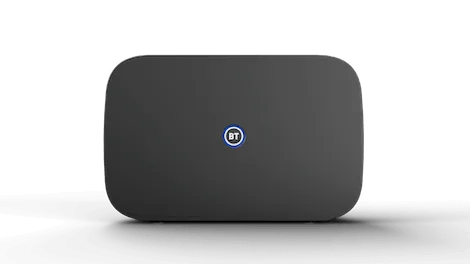
Smart Hub 3 uses dual-band Wi-Fi 6. A compatible phone or laptop close to the hub can receive a speed near the 300Mbps package average, while Gigabit Ethernet can carry the full connection speed to a wired device.
Its four 1Gbps LAN ports are suitable for computers, consoles and televisions. The 2.5Gbps WAN port connects the hub to the Openreach ONT but does not increase Full Fibre 300 beyond its package speed.
| Feature | Details |
|---|---|
| Wi-Fi | Dual-band Wi-Fi 6 |
| Ethernet | Four 1Gbps LAN ports |
| ONT connection | One 2.5Gbps WAN port |
| Digital Voice | Phone socket and built-in DECT |
| Wi-Fi extensions | Compatible with BT Complete Wi-Fi and Hybrid Connect |
Wireless coverage will usually become a restriction before the router’s capacity. Solid walls, interference, distance and older devices can reduce Wi-Fi performance, particularly on upper floors or at the opposite end of a larger home.
A third-party router will not increase the broadband connection beyond 300Mbps. It can still be useful for customers wanting a mesh system, Wi-Fi 7, more network controls or wider wireless coverage.
Place Smart Hub 3 in an open, central position where possible. Connect gaming computers, consoles and other fixed devices by Ethernet for more consistent speeds and latency.sition where possible. A cupboard, floor-level corner or space behind a television will restrict its wireless range.
Complete Wi-Fi and Hybrid Connect with Full Fibre 300
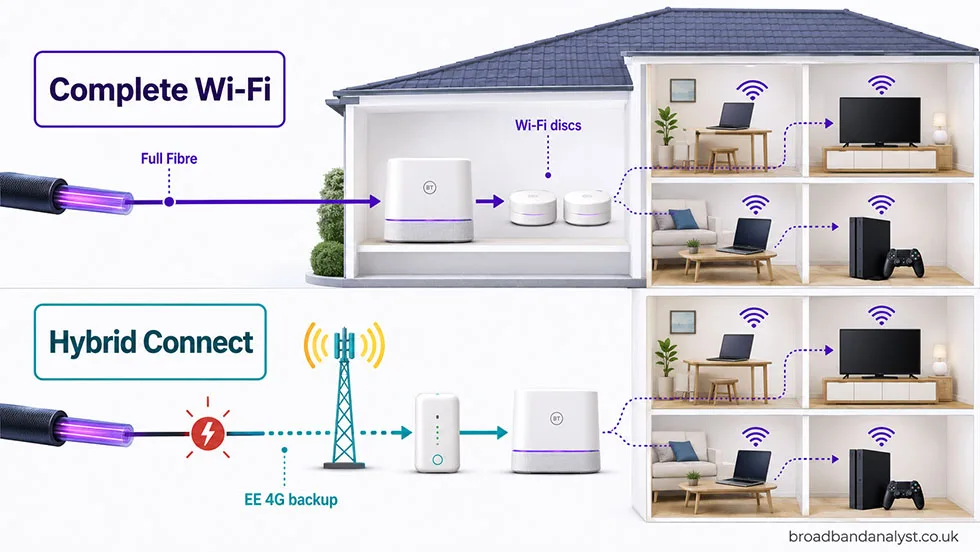
Complete Wi-Fi and Hybrid Connect solve separate broadband problems. Complete Wi-Fi improves wireless coverage inside the home, while Hybrid Connect supplies temporary internet access when the fixed connection fails. Neither increases the 300Mbps package speed.
Complete Wi-Fi
Complete Wi-Fi uses wireless discs to extend the Smart Hub’s signal into rooms with poor coverage. BT supplies one disc initially and can send up to two more if diagnostic checks confirm that they are needed.
The guarantee concerns a reliable Wi-Fi connection in each room of the main home. It does not promise 300Mbps throughout the property or extend to gardens, sheds and other outbuildings. If BT cannot meet the guarantee, the customer can receive a one-off £100 bill credit under the applicable conditions.
A wireless disc can deliver less speed than a device close to the hub because it also communicates with the hub over Wi-Fi. Place it between the hub and the poorly connected room rather than inside the dead spot. Ethernet remains preferable for televisions, consoles and computers that need consistent performance.
Hybrid Connect
Hybrid Connect automatically switches compatible BT equipment to EE’s 4G network when the fixed broadband connection fails. It can keep browsing, messaging, video calls and lighter home-working tasks online while BT restores the Full Fibre service.
The backup speed depends on indoor EE coverage and local mobile-network use. It will normally be considerably lower than 300Mbps, so large downloads and multiple high-resolution streams can become restricted. The hub and Hybrid Connect device also require electricity and will not operate during a power cut without a separate power supply.
Choosing the appropriate add-on
- Choose Complete Wi-Fi if Full Fibre 300 reaches the hub correctly but some rooms have weak or unreliable Wi-Fi.
- Choose Hybrid Connect if maintaining internet access during a broadband fault is important and the home receives a reliable EE 4G signal.
- Choose both only when the household needs wider Wi-Fi coverage and automatic broadband backup.
- Selected Halo packages combine these services with additional account benefits. Compare the complete contract cost before adding Halo.
How fast is BT Full Fibre 300?
BT Full Fibre 300 offers an average 300Mbps download speed and 49Mbps upload speed. The connection is asymmetrical: downloads are more than six times faster than uploads.
Download speed
A 300Mbps connection can transfer data at a theoretical maximum of 37.5 megabytes per second. Protocol overheads, the remote server, home equipment and Wi-Fi conditions mean a file normally takes longer than the ideal calculation.
Unlike part-fibre broadband, Full Fibre does not lose speed because a home is farther from a street cabinet. The fibre cable reaches the ONT inside the premises, although congestion, faults and home-network limitations can still affect a test result.
Download times and simultaneous use
Ideal download times at 300Mbps are:
| File size | Minimum download time |
|---|---|
| 10GB | 4 minutes 27 seconds |
| 50GB | 22 minutes 13 seconds |
| 100GB | 44 minutes 27 seconds |
These times assume the source can deliver the file at the full line speed. Game platforms and cloud services can limit transfer speed, while wireless devices can receive less bandwidth than a wired computer.
A single 4K video stream commonly needs 15–25Mbps. Four simultaneous 4K streams would therefore use 60–100Mbps, leaving substantial capacity for browsing, video calls and gaming. Large downloads can use all available bandwidth unless the device or application limits them.
Online gaming uses relatively little bandwidth once a game is running. Latency, jitter and packet loss have a greater effect on responsiveness. Full Fibre removes the copper access line, but game-server location, network routing and Wi-Fi conditions still influence latency. Ethernet remains the best connection for a console or gaming computer.
Upload speed
The average 49Mbps upload speed is sufficient for multiple video calls, sending ordinary work files, cloud photo backups and online gaming. At the full speed, a 10GB upload has an ideal minimum time of 27 minutes 13 seconds, while 100GB takes 4 hours 32 minutes.
That difference matters to video editors, photographers and households that send large backups every day. A provider offering 300Mbps symmetrical broadband can complete the same upload more than six times faster.
Wired and Wi-Fi performance
A computer connected to Smart Hub 3 by Gigabit Ethernet gives the clearest test of the broadband service. Use a suitable cable, close bandwidth-heavy applications and make sure the computer has a Gigabit Ethernet connection.
A phone or laptop can record a lower Wi-Fi speed even when the broadband line is performing correctly. Common causes include:
- the device connecting through the 2.4GHz band;
- distance or solid walls between the device and hub;
- interference from neighbouring wireless networks;
- an older Wi-Fi standard or slower device radio;
- bandwidth being used by other devices;
- a VPN or security application reducing test performance.
BT’s Stay Fast Guarantee measures the speed reaching the hub. It does not guarantee 300Mbps to every phone, tablet or computer over Wi-Fi.
BT Full Fibre 150, 300, 500 or 900?
Full Fibre 300 should be compared first with Full Fibre 150 and 500. Full Fibre 900 serves households with much heavier download requirements.
| Plan and speed | Best suited to |
|---|---|
|
Full Fibre 150 150Mbps download, 30Mbps upload | One or two people, browsing, streaming, home working, online gaming |
|
Full Fibre 300 300Mbps download, 49Mbps upload | Families, multiple 4K streams, video calls, gaming, regular downloads |
|
Full Fibre 500 500Mbps download, 73Mbps upload | Larger households, frequent game downloads, cloud backups, simultaneous heavy use |
|
Full Fibre 900 900Mbps download, 110Mbps upload | Very busy homes, daily large downloads, extensive simultaneous use, large uploads |
Full Fibre 150 or 300
Full Fibre 150 is sufficient for one or two people who mainly stream, browse, work from home and play games online. Choose Full Fibre 300 when several people regularly use high-bandwidth services at the same time or large downloads are common.
Moving from 150Mbps to 300Mbps doubles download capacity, but it will not improve video quality once a stream already has sufficient bandwidth or reduce gaming latency by itself.
Full Fibre 300 or 500
Full Fibre 500 is more useful for larger households, frequent game installations and substantial cloud transfers. Full Fibre 300 remains sufficient for most families using several 4K streams, video calls and gaming sessions together.
Compare the complete contract costs rather than speed alone. If Full Fibre 500 costs only slightly more after setup charges, annual increases and Reward Cards, the additional capacity can offer better value. Check our BT broadband deals page for current offers across the complete BT range.
Full Fibre 900 is unnecessary unless large downloads or several bandwidth-intensive activities occur frequently. Customers uncertain between 300Mbps and 900Mbps should consider Full Fibre 500 first.
Installation and availability
BT Full Fibre 300 is available only at premises reached by the Openreach Full Fibre network which reached 23 million UK homes and businesses by May 2026, more than two-thirds of premises. The postcode and premises check confirms availability and whether the order requires an engineer visit.
A first Full Fibre installation normally requires an engineer to bring fibre into the home and install an Optical Network Terminal. The ONT connects to Smart Hub 3 by Ethernet, and both devices need a nearby power socket. Agree the ONT position carefully because it affects where the hub can be placed.
Customers who already have a compatible Openreach ONT can normally upgrade from Full Fibre 150 to 300 remotely. An engineer is required only when the fibre line, ONT or internal cabling needs installation or repair.
Most residential provider changes use One Touch Switch. Contact BT to place the order, and BT will arrange the transfer with the existing provider. Do not cancel the old broadband separately unless either provider instructs you to do so.
Our BT Broadband review explains the installation and switching process in more detail.
Is BT Full Fibre 300 any good?
Yes. BT Full Fibre 300 is a good all-round package for families and multi-device homes. It gives several people enough bandwidth to stream, work, game and download simultaneously without paying for the additional capacity of Full Fibre 900.
The plan offers better value than Full Fibre 150 when several high-bandwidth activities regularly overlap. Full Fibre 150 remains sufficient for one or two people, while Full Fibre 500 is more suitable for larger households and frequent large downloads. Full Fibre 500 can be the better purchase when its total cost is only slightly higher than Full Fibre 300.
BT often costs more than Plusnet and some independent full-fibre providers. The additional cost is easier to justify for customers who value the Smart Hub 3, Stay Fast Guarantee and access to Digital Voice, EE TV, Complete Wi-Fi or Hybrid Connect. Customers prioritising faster uploads or Wi-Fi 7 should compare alternative providers.
In Ofcom’s latest quarterly data, covering January to March 2026, BT’s broadband complaint rate was statistically comparable with the industry average.
Choose Full Fibre 300 when 150Mbps would restrict a busy household but regular use does not justify paying for 500Mbps. It offers a useful balance of speed, household capacity and cost within BT’s Full Fibre range.
BT Full Fibre 300 compared with rival packages
Several national providers offer a similar plan, while some CityFibre and independent networks offer much faster uploads. Availability remains the first filter because not every network reaches every premises.
- Plusnet Full Fibre 300
Average 300Mbps download and 50Mbps upload speeds. It includes the Wi-Fi 5 Hub Two and often costs less than BT. - Sky Full Fibre 300
Average 300Mbps download and 40Mbps upload speeds. It is better suited to households combining broadband with Sky TV. - EE Full Fibre 300
Average 300Mbps download and 50Mbps upload speeds. Qualifying orders include a Wi-Fi 7 router. - Virgin Media M350
Average 362Mbps download and 36Mbps upload speeds. It downloads faster than BT Full Fibre 300, but BT offers the faster upload speed. - CityFibre and independent providers
Selected 300Mbps plans offer upload speed equal to the download speed. They are better for frequent large uploads, although availability varies.
Plusnet is the closest alternative for customers who want the same Openreach connection without BT’s wider range of optional services. Sky has the clearer television advantage, EE supplies newer wireless equipment with current qualifying orders, and Virgin Media offers the faster average download.
BT remains more attractive when its Reward Card reduces the total cost or when Complete Wi-Fi, Hybrid Connect, Digital Voice or EE TV is valuable to the household
BT Full Fibre 300 FAQs
Does BT Full Fibre 300 always deliver 300Mbps?
No. The 300Mbps figure is the average download speed, not a guarantee for every device. BT guarantees 150Mbps download and 10Mbps upload to the hub. Wi-Fi results can be lower because of distance, walls, interference and device limitations.
How many people can use BT Full Fibre 300 simultaneously?
It is suitable for a family with several active users. At Netflix’s recommended 15Mbps per 4K stream, four streams require 60Mbps. Two 1080p Zoom calls add up to 6Mbps download and 7.6Mbps upload, leaving 234Mbps download and 41.4Mbps upload before other activity and connection overheads.
Is Full Fibre 300 worth choosing instead of Full Fibre 150?
Choose 300 when several people regularly stream, work or download simultaneously. It doubles the download speed and adds 19Mbps upload capacity. An ideal 100GB download falls from 1 hour 28 minutes 53 seconds on Full Fibre 150 to 44 minutes 27 seconds on Full Fibre 300.
Is Full Fibre 500 significantly faster than Full Fibre 300?
Full Fibre 500 offers 67% more download speed and 49% more upload capacity. An ideal 100GB download takes 26 minutes 40 seconds instead of 44 minutes 27 seconds. Choose Full Fibre 500 when large game installations, cloud transfers or overlapping heavy use are frequent.
Is the 49Mbps upload speed sufficient for home working?
Yes. Two 1080p Zoom calls require up to 7.6Mbps combined upload bandwidth, leaving more than 41Mbps for cloud syncing and other devices. However, an ideal 10GB upload still takes 27 minutes 13 seconds, so frequent large video or backup uploads are faster with a symmetrical provider.
Does Full Fibre 300 reduce gaming latency?
The 300Mbps speed does not automatically reduce ping compared with another BT Full Fibre plan. It shortens installations and prevents other household activity from consuming all available bandwidth. Game-server location, network routing and home Wi-Fi have a greater effect on latency, so connect the console or computer by Ethernet where possible.
Can Smart Hub 3 deliver 300Mbps over Wi-Fi?
A modern Wi-Fi 6 device close to Smart Hub 3 can receive a speed near 300Mbps under good wireless conditions. BT does not guarantee this result. Its four 1Gbps Ethernet ports can carry the full package speed, making a wired connection the better way to test the broadband service.
How does the Full Fibre 300 Stay Fast Guarantee work?
The guarantee applies to 150Mbps download and 10Mbps upload speeds reaching the BT Hub, not individual Wi-Fi devices. Customers must report the problem and complete BT’s diagnostic checks.
BT can issue a £20 Reward Card for an eligible claim, with up to four claims permitted each year. If BT cannot restore the guaranteed speed within 30 days, the customer can leave without paying an early termination charge.
Does an upgrade from Full Fibre 150 to 300 require an engineer?
Usually not when the premises already has an active, compatible Openreach ONT. BT can normally change the speed remotely. An engineer is required when the fibre connection, ONT or internal cabling needs installation, repair or replacement.
Is Full Fibre 300 fast enough for EE TV and other devices?
Yes. TNT Sports Ultimate requires a broadband speed above 40Mbps, while Netflix recommends 15Mbps for one 4K stream. Full Fibre 300 can therefore run several television streams alongside gaming, browsing and video calls. Our BT broadband and TV packages guide compares the available EE TV options.