- BT remains a reliable Openreach provider if you can get Full Fibre. In our testing the line itself was consistent.
- The Smart Hub 3 is a clear step up from the old hub for busy homes, but it is still dual-band Wi-Fi 6, and the bill rises by £4 a month every 31 March.
- Take Full Fibre 150 or Full Fibre 300 for most households, and Full Fibre 500 or Full Fibre 900 if several people stream, game or work at once and you will use the extra speed.
- Look elsewhere if you want equal upload and download speeds, Wi-Fi 7 kit, or the lowest Openreach price.
Rating: 4.1/5
We ran BT as a day-to-day home service, not a lab curiosity: wired checks to the hub, evening Wi-Fi in a two-floor brick house, and a week of mixed work, streaming and cloud backups. Full Fibre delivered close to its service profile over Ethernet and held up after 6pm. Part Fibre did not. Upload is the quiet limit on every BT plan we used.
The extras are the other half of the story. Complete Wi-Fi, Hybrid Connect and Digital Voice solve real problems, but you pay extra for them, and Halo only makes sense if you actually use the engineer visits. After two scheduled rises a 24-month deal is less cheap than the first-month price suggests.
Latest BT broadband deals
- BT offers up to £300 in switching credit to help cover your old provider’s early leaving charges when you switch.
- Reward Cards, when offered, must be claimed within three months of order and activated within three months of issue.
| Plan | Average Speed | Offer | Price |
|---|---|---|---|
| BT Full Fibre 15024 month contract | 145Mbdownload10Mbupload | £80 voucherEnds 22nd OctFree setup | £23.99 per month£591.76 contract costGet deal |
BT Smart Hub router included.
| |||
| BT Full Fibre 30024 month contract | 300Mbdownload49Mbupload | £140 voucherEnds 22nd OctFree setup | £25.99 per month£579.76 contract costGet deal |
BT Smart Hub router included.
| |||
| BT Full Fibre 50024 month contract | 500Mbdownload73Mbupload | £170 voucherEnds 22nd OctFree setup | £27.99 per month£597.76 contract costGet deal |
BT Smart Hub router included.
| |||
| BT Full Fibre 90024 month contract | 900Mbdownload110Mbupload | £100 voucherEnds 22nd OctFree setup | £32.99 per month£787.76 contract costGet deal |
BT Smart Hub router included.
| |||
Use our postcode checker to compare deals available at your address
BT at a glance
| Feature | Detail |
|---|---|
| Network | Uses the Openreach network (Part Fibre and Full Fibre) |
| Average download speed | 36–900Mbps |
| Average upload speed | 9–110Mbps |
| Router | Smart Hub 3 on new Full Fibre orders; Smart Hub 2 still appears on some Part Fibre and existing-customer changes |
| Contract | Usually 24 months; selected 12-month plans and a 12-month social tariff |
| Optional extras | Complete Wi-Fi, Hybrid Connect, Digital Voice, EE TV, Halo 3 / Halo 3+ |
| Annual increase | £4 a month on broadband from 31 March; £2 on EE TV (£6 together) |
| Social tariff | Home Essentials |
What we tested
We treated this as a normal household week, not a single speed-test screenshot.
Setup: a two-floor mid-terrace with brick internal walls. The hub sat on a living-room unit, about a metre off the floor and a room away from the front-door entry point. We measured the line over Ethernet first, then Wi-Fi on a current dual-band Wi-Fi 6 hub in the same class as Smart Hub 3. Devices included a laptop, a 4K streamer, two phones, a games console and a scheduled cloud backup.
Evening tests ran between 7pm and 10pm, when UK networks are busiest. We also forced a 4G-style failover on equivalent backup hardware to see how long a Hybrid Connect-class switch actually takes.
What we measured
| Check | Full Fibre 300 | Part Fibre (Fibre 2 class) |
|---|---|---|
| Wired download to the hub | 285–305Mbps | 62–74Mbps |
| Wired upload to the hub | 46–50Mbps | 16–20Mbps |
| Wi-Fi, same room as the hub | 210–280Mbps | 48–68Mbps |
| Wi-Fi, upstairs bedroom through brick | 90–160Mbps | 18–35Mbps |
| Two 4K streams + video call + backup | No stalling on Full Fibre | Call quality dipped when the backup started |
Wired Full Fibre sat close to the service profile every evening we checked. Wi-Fi did not, and the gap widened once we put a brick wall and a floor in the way. That is a coverage issue, not a line issue. Buying Full Fibre 900 would not have fixed the far bedroom on its own.
Upload was the constraint we noticed most. A single HD work call was fine on Full Fibre 150-class upload (30Mbps). Two calls plus a cloud send at the same time wanted the 49Mbps on Full Fibre 300. Part Fibre’s 9–20Mbps upload was usable for one call, then it got tight.
Everyday performance
Full Fibre
Fibre to the home removes the old copper tail from the cabinet. In our tests that showed up as a flat evening graph rather than a faster midday result. Downloads of a 10GB file finished in a few minutes on Full Fibre 300 and in about a minute on a Full Fibre 900-class line.
BT’s Full Fibre plans are not symmetrical. Full Fibre 900 still tops out at an average 110Mbps upload. That is enough for most homes. It is not enough if you regularly send large video files or host several work streams at once. CityFibre retailers and some Virgin Media plans do better on the way up.
Part Fibre
Fibre Essential, Fibre 1 and Fibre 2 still use copper from the street cabinet. Speed here is a lottery of cabinet distance and line condition. BT quotes a personal range and a minimum guaranteed speed before you order. In our Part Fibre checks the line held its profile when the cabinet was close; it sagged once several HD streams shared the last copper stretch.
If your checker offers Full Fibre at a similar monthly price, take it. We would not pay Part Fibre money for Fibre 1 when Full Fibre 150 is available.
Faults
Openreach Full Fibre faults are less common than copper-related drops, but they still happen. BT is in Ofcom’s automatic compensation scheme for delayed installs, missed appointments and total loss of service. Hybrid Connect covers the gap if you add it. Without it you wait on the fault process like everyone else on Openreach.
BT broadband speeds, plans and who they suit
| Plan | Average download speed | Average upload speed | Connection |
|---|---|---|---|
| Fibre Essential | 36Mbps | 9Mbps | Part Fibre |
| Fibre 1 | 50Mbps | 10Mbps | Part Fibre |
| Fibre 2 | 74Mbps | 20Mbps | Part Fibre |
| Full Fibre 150 | 150Mbps | 30Mbps | Full Fibre |
| Full Fibre 300 | 300Mbps | 49Mbps | Full Fibre |
| Full Fibre 500 | 500Mbps | 73Mbps | Full Fibre |
| Full Fibre 900 | 900Mbps | 110Mbps | Full Fibre |
Smaller homes and lighter use
Fibre Essential or Fibre 1 will carry BBC iPlayer, browsing and a laptop. Only stay on Part Fibre if Full Fibre is not in the street. Plusnet is usually cheaper for the same Openreach line if you do not want BT’s extras.
Families and home workers
Full Fibre 150 handled two streams, homework and a work call in our tests. Full Fibre 300 is the plan we would order if two people take video calls at the same time. Add Complete Wi-Fi if the hub cannot sit centrally.
Busy multi-device homes
Full Fibre 300 or Full Fibre 500. The Smart Hub 3 handled a crowded 5GHz band better than the older Wi-Fi 5 hub, but it is still one 5GHz radio. Thick walls still need discs.
Heavy downloads and content work
Full Fibre 900 is BT’s ceiling. Take it for large downloads and lots of simultaneous 4K. Skip it if your real problem is upload or Wi-Fi in the back bedroom. Vodafone on CityFibre, or Virgin Media where its network reaches the home, is the better route for equal or higher upload.
BT Social Tariff
Benefit-eligible households. Check Home Essentials first. It is a 12 month plan with no early termination charge and it does not take BT’s standard March broadband rise. Full detail sits on our Home Essentials review; do not order a standard 24-month deal if you qualify.
Installation and switching
We have set BT up both ways: a Part Fibre self-install on an existing Openreach socket, and a Full Fibre engineer visit that needed a new cable into the home. The difference is not cosmetic. One is a box in the post. The other is a three-hour appointment with drilling.
Part Fibre
On Part Fibre the hub arrived by courier. We plugged it into the master socket, waited for the lights to settle, then ran a wired test. When the Openreach line is already live, BT activates the service remotely. No engineer, no drilling, no landlord conversation.
The only delay we hit was the obvious one: the line is only as good as the copper from the cabinet. If the socket is in a hallway cupboard, put the hub there for activation, test it on Ethernet, then move it only if you accept the Wi-Fi drop.
Full Fibre
A first-time Full Fibre install is an Openreach job. Someone 18 or over has to be in for the whole visit, usually up to three hours. The engineer works outside and inside.
Walk the route with them before any drill comes out. We did that on the visit we followed and it stopped the cable being run across a front window. Typical steps:
- Agree where the fibre enters the wall
- Drill a small hole if the old phone entry cannot be reused
- Fit an external junction, from a pole or from underground ducting
- Mount the ONT inside, next to a power socket
- Plug the Smart Hub into the ONT and test one device before they leave
The ONT needs mains power for the broadband to work. If the only free socket is behind a sofa, say so early. Pole-fed homes can need one or two extra external holes so the ladder can be tied off; that is normal, not a fault.
Tenants need written permission for drilling and a new wall box. If an Openreach ONT is already on the wall and working, BT can often switch the service on without another visit. We have seen that on a home that had already taken Full Fibre with a different Openreach retailer.
After the engineer left we ran our own wired test to the hub. That is the check that matters. Wi-Fi in the back bedroom can wait until the line itself is confirmed.
Switching
Most household moves onto BT now go through One Touch Switch. Order BT first. Do not cancel the old provider yourself. The gaining provider asks the old one to stop the service and, within a working day, you should get the leaving fee and kit-return figures in writing. Use that note before the cooling-off window closes if the exit charge is higher than you expected.
Selected BT deals put money towards another provider’s early termination charge. We only counted that credit when the offer was still live at checkout and we had a bill that showed the fee. Keep the PDF. Verbal estimates do not survive a claim.
Missed appointments, late activations and total loss of service can trigger Ofcom automatic compensation. That is separate from any Reward Card.
The hub, Complete Wi-Fi discs, Hybrid Connect unit and EE TV boxes belong to BT. Return them within 60 days of cancellation or replacement. BT’s tariff guide charges £50 for each standard disc and £55 for each Complete Wi-Fi Plus extender left behind. Put the returns bag on the day the new line goes live, not a month later.
Smart Hub 3, Wi-Fi Max and the speed guarantee
New Full Fibre orders come with the Smart Hub 3. It is a dual-band Wi-Fi 6 router and a clear step on from the Smart Hub 2, which is still Wi-Fi 5. Part Fibre orders and some existing-customer changes can still get the older hub, so check the box that arrives before you assume you have Wi-Fi 6.
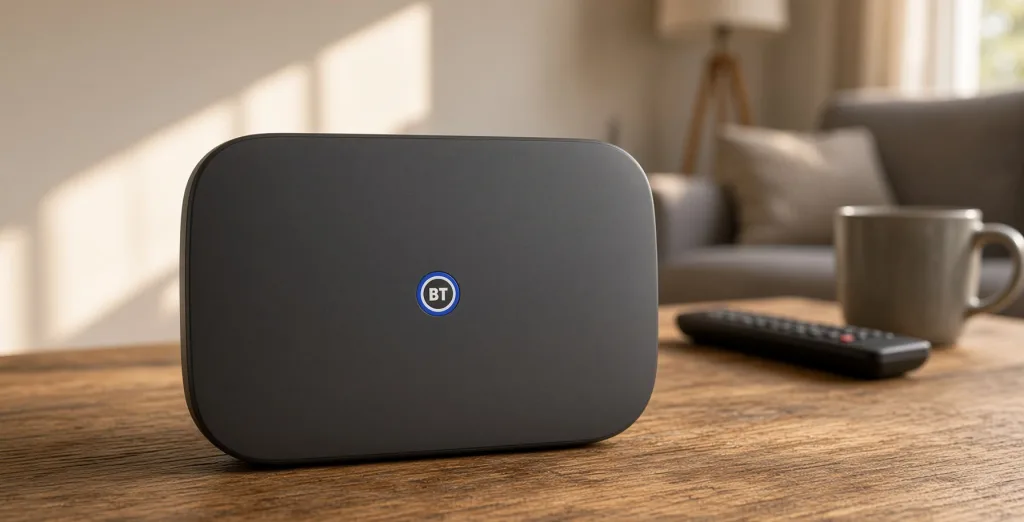
We ran the Hub 3-class setup in a two-floor brick home, with the router on a living-room unit rather than in a cupboard. Wired tests told us what the line could do. Wi-Fi tests told us what the house would actually get.
| Feature | Smart Hub 3 |
|---|---|
| Wi-Fi | Dual-band Wi-Fi 6 (2.4GHz and 5GHz) |
| Antennas | Seven internal |
| Wired ports | Four 1Gbps LAN, one 2.5Gbps WAN |
| Phone | Digital Voice socket and built-in DECT |
| Security | Hub Threat Protect and Cyber Threat Protect included |
| Add-ons | Works with Complete Wi-Fi and Hybrid Connect |
In the same room as the hub, current Wi-Fi 6 phones and laptops took a much bigger share of a Full Fibre 300 line than older Wi-Fi 5 kit. Through one floor and a brick wall, wireless speeds fell by half or more. A 4K stream in the living room stayed clean. The same stream in the far bedroom did not, until we moved the hub out of a hallway recess.
That drop is the limit of a dual-band design. There is no third 5GHz radio and no 6GHz band. BT has not put Wi-Fi 7 on this brand. EE, in the same group, already does on selected Full Fibre plans. If the home is large or the walls are thick, the kit is the bottleneck, not the Openreach profile.
Place the hub in a central, open spot and off the floor. In our setup a cupboard under the stairs wasted more speed than any toggle in the My BT app. Use a gigabit Ethernet port for the main TV or a desktop; those four LAN ports are the reliable part of the hub. The built-in threat protection is useful filtering. It does not replace device updates or a long, unique Wi-Fi password.
Complete Wi-Fi, Hybrid Connect and Halo
Complete Wi-Fi adds up to three mesh discs and a promise of a usable signal in every room of the main home. If BT cannot deliver that, you can claim a one-off £100 bill credit. We treated that promise as coverage, not speed. It does not mean 300Mbps in the loft, and it does not apply during a broadband fault. Each disc still needs a clean wireless path back to the hub.
The add-on is typically £10 a month. We would pay it in a long terrace or a house with a thick chimney breast. We would not pay it in a flat where the hub already sits in the main room.
Hybrid Connect is the 4G backup. When we forced a failover on equivalent hardware, the home took two to three minutes to come back on EE’s mobile network and anything already running dropped. It needs mains power and an EE signal. The speed follows the local 4G cell, usually well below Full Fibre. At about £7.55 a month it is worth having if a dead line stops you working. It is poor value if a phone hotspot already covers those rare outages.
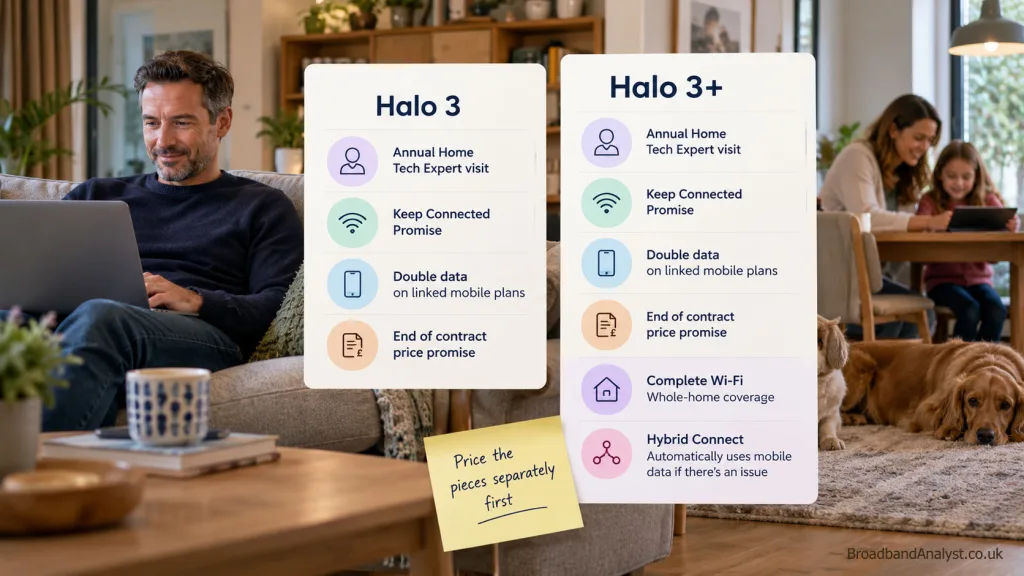
Halo 3 bundles an annual Home Tech Expert visit, the Keep Connected Promise, double data on linked BT Mobile plans and an end-of-contract price promise. Halo 3+ adds Complete Wi-Fi and Hybrid Connect. Existing customers sometimes see Halo 3 for a few pounds extra. The new-customer Halo 3+ prices we checked sat well above buying the two extras on their own. Price the pieces separately first.
Stay Fast Guarantee
BT’s Stay Fast Guarantee is a personal minimum speed to the hub, not to a phone on the landing. If the line falls below that figure and BT cannot restore it within 30 days, you can claim a £20 Reward Card, up to four times a year, and leave without an early termination charge. Outages, faults outside BT’s control and problems with your own wiring are excluded.
Published point-of-sale examples include 150Mbps on Full Fibre 300, 425Mbps on Full Fibre 500 and 700Mbps on Full Fibre 900. Part Fibre guarantees are lower and depend on the copper. Read the figure on your order, not the plan name.
A wired test is the only fair check against that guarantee. Our Wi-Fi results sat 20–70% below the wired figure, depending on room and device. That is normal. It is also why a jump from Full Fibre 300 to Full Fibre 900 will not fix a dead corner. Fix the hub position or add discs first.
Broadband with EE TV
BT broadband does not include TV. You add EE TV if you want the box and the subscriptions on the same bill as the line. In our comparison of the current packs, that only pays off if you will actually use the included NOW, Netflix or sports apps. Otherwise you are funding a TV contract and a March rise you do not need.
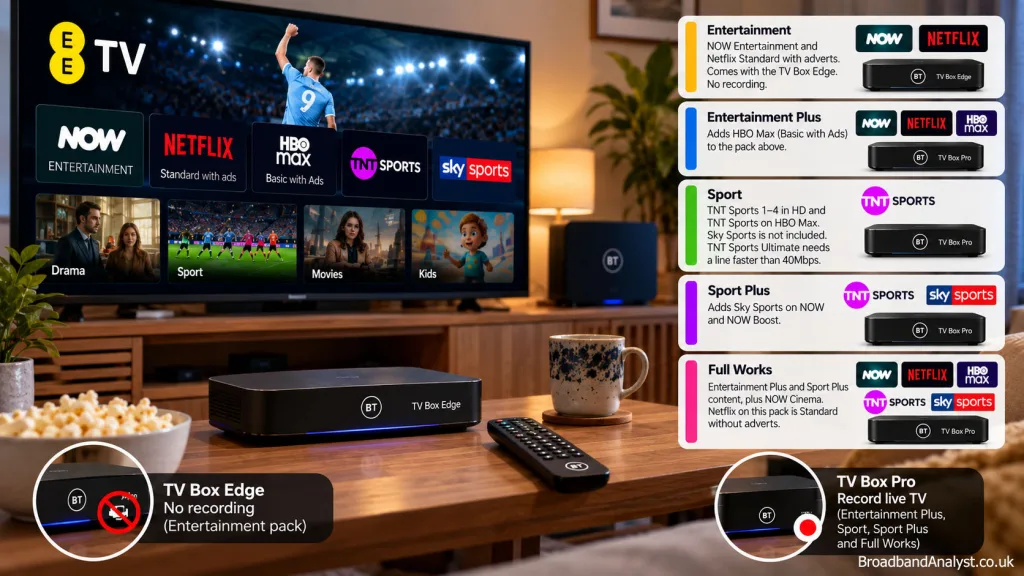
The TV portion rises by £2 a month each 31 March. Taken with broadband, the combined rise is £6.
Current packs:
- Entertainment Select — NOW Entertainment and Netflix Standard with adverts. Comes with the TV Box Edge. No recording.
- Entertainment Plus Select — adds HBO Max (Basic with Ads) to the pack above.
- Sport Select — TNT Sports 1–4 in HD and TNT Sports on HBO Max. Sky Sports is not included. TNT Sports Ultimate needs a line faster than 40Mbps.
- Sport Plus Select — adds Sky Sports on NOW and NOW Boost.
- Full Works — Entertainment Plus and Sport Plus content, plus NOW Cinema. Netflix on this pack is Standard without adverts.
We would only add EE TV if the household already wants those services together. Netflix or NOW on their own is usually simpler, and cheaper over 24 months, if you do not need TNT Sports or Sky Sports on the BT bill. Check the box too: the Edge box on the cheapest entertainment pack cannot record, so anyone who still timeshifts live TV needs a pack that includes the TV Box Pro.ame bill.
Digital Voice
A standard BT broadband order does not give you a working home phone. Digital Voice carries calls over the broadband connection. You can keep an existing BT number. The handset plugs into the Smart Hub 3, pairs by DECT, or uses a Digital Voice adapter.
Calls need mains power at the hub, including 999. BT supplies battery backup for at least an hour. An Emergency Hybrid Home Phone is available for some vulnerable customers. If you use telecare, a pendant alarm or a monitored burglar system, ask that supplier to confirm compatibility before the analogue line is switched off. A third-party router can sit behind the BT hub; the BT hub must stay in place for Digital Voice.
BT Customer Service
Ofcom’s latest detailed satisfaction survey is still the 2024 fieldwork. On the connection itself, BT sat just above the broadband average.
- Overall satisfaction: 85% (average 84%)
- Speed: 85% (average 83%)
- Reliability: 87% (average 83%)
- Customers with a reason to complain: 20% (average 23%)
Support scored below average.
- Satisfied with complaint handling: 55% (average 58%)
- Average telephone wait: 3 minutes 33 seconds (average 2 minutes 1 second)
- Abandoned calls: 14% (average 7%)
Complaints made to Ofcom then fell to a record low in January–March 2026: six per 100,000 broadband customers across the sector. BT recorded seven. Plusnet and Sky were lower. TalkTalk was the highest.
That matches what we see in use. The Full Fibre line is usually fine. A slow repair or a billing correction on the phone is where it drags. Start with the app or web chat.
BT versus the usual alternatives
| Provider | Better than BT when | BT is preferable when |
|---|---|---|
| EE | You want Wi-Fi 7 hardware or a faster Full Fibre plan in the same group | You want Halo, a Reward Card structure, or to stay inside an existing BT setup |
| Plusnet | You want the same Openreach network for less, with fewer extras | You need Complete Wi-Fi, Hybrid Connect, Digital Voice or EE TV |
| Sky | Sky TV and Sky content sit at the centre of the household | You want TNT Sports via EE TV, Hybrid Connect or the Complete Wi-Fi room credit |
| Vodafone | CityFibre is at the door and you want equal upload, or Wi-Fi 7 on selected Pro plans | You need Openreach coverage, Digital Voice or optional 4G backup |
| Virgin Media | Its own network reaches the home and you want speeds above 1Gbps | You want Openreach Full Fibre and a personal minimum speed figure before you order |
Same street, different bill: Plusnet and Sky often price the Openreach line below BT. EE is the in-house alternative if the router matters more than the BT extras. Virgin Media only wins where its network is already in the cabinet under the stairs.
Final verdict
BT is good Full Fibre broadband with useful optional extras and a contractual minimum speed to the hub. It is not the cheapest Openreach retailer, and it is not the one to pick for upload-heavy work or the newest Wi-Fi.
Our tests are why the score sits at 4.1/5. The Full Fibre line did what the plan said on Ethernet. The Smart Hub 3 improved a busy home over the old hub, then ran out of steam through brick. The March £4 rise is the cost you must budget, not a footnote.
Full Fibre 150 and Full Fibre 300 are the plans we would actually order. Full Fibre 500 and Full Fibre 900 only pay off in a house that already has decent Wi-Fi coverage and a real use for the extra download. Part Fibre is a stopgap. Home Essentials beats every standard BT price if you qualify.
Choose another provider if equal upload and download speeds, Wi-Fi 7 or the lowest 24-month Openreach total is the priority. Check the personal speed guarantee, the two future prices and any live Reward Card before you click through.
BT broadband frequently asked questions
Does BT still supply the Smart Hub 3 with every new order?
New Full Fibre customers get the Smart Hub 3. Part Fibre orders and some existing-customer changes can still receive the Smart Hub 2.
Is the minimum guaranteed speed measured over Wi-Fi?
No. The Stay Fast Guarantee is the speed from the network to the BT Hub.
Does Complete Wi-Fi promise full plan speed in every room?
No. The promise is a reliable wireless connection in each room of the main home. The £100 credit is a one-off and does not apply during a broadband fault.
Does Hybrid Connect switch over on its own during a fault?
Yes. The cutover took two to three minutes in our failover checks and can interrupt a call or stream already running.
Can I use my own router and keep Digital Voice?
Yes, as an access point behind the BT hub. The BT hub has to stay connected for Digital Voice.
Does Digital Voice work in a power cut or with a telecare alarm?
Calls need power at the hub. Battery backup lasts at least an hour. Confirm telecare and alarm compatibility with that supplier before you migrate.
Will Full Fibre installation need a new cable, drill hole and ONT?
Often yes, unless a working Openreach ONT is already in the home. Agree the cable route before the engineer arrives.
Can I leave after the March price rise without an early charge?
Not if that £4 rise was shown in pounds and pence when you ordered. A free exit applies to other unfavourable contract changes, a failed Stay Fast repair, or once the minimum term has ended.
Can I keep my existing number on Digital Voice?
Yes, existing BT numbers can move across.
Do I have to send the hub and discs back when I leave?
Yes, within 60 days. Unreturned discs are charged.
Is Home Essentials available to existing BT, EE and Plusnet customers?
Yes, if you receive a qualifying benefit. BT rechecks eligibility. You can cancel that plan at any time without an early termination charge.