Virgin Media M350 broadband review
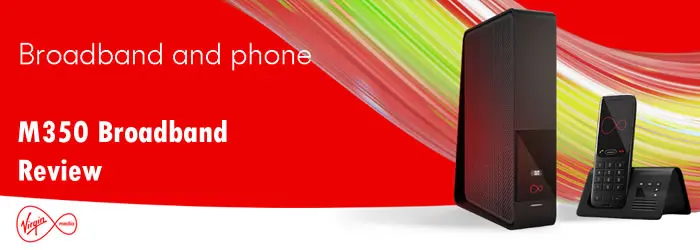
Virgin Media M350, the provider’s mid-range fibre broadband plan, comes with speeds and features that cater to the needs of multi-device households that frequently download large files, stream across multiple screens, play games with fast download requirements, handle large updates, and require quick downloads for working from home.
M350 comes with an average download speed of 362Mbps and an average upload speed of 36Mbps.
Virgin Media M350 plan details
- Average download speed: 362Mbps
- Average upload speed: 36Mbps
- How many devices: 1 – 8 devices
- Estimated download speed: 181–362Mbps
- Estimated upload speed: 18–36Mbps
- Minimum guaranteed download speed (MGDS): 181Mbps
- Network technology: Virgin Media cable network (DOCSIS)
- Latency range: 10 – 20ms
- Plan options: broadband only, broadband + phone, broadband + TV, Volt bundles with O2 SIM
- Router: Hub 3 / Hub 4 / Hub 5
- Wi-Fi standard: Wi-Fi 5 on Hub 3 and Hub 4; Wi-Fi 6 on Hub 5
- Contract length: 24 months
- Price range: £27 to £36 per month
- Optional extras: WiFi Max, call add-ons, TV packs, Volt bundles
Today’s Offers
| Plan | Speed | Price | |
|---|---|---|---|
 M350 Fibre M350 Fibre 24 month contract |
362Mb avg |
£28.99 / month £347.88 / year More details |
|
| Free Setup. | |||
|
M350 Fibre + Phone 24 month contract |
362Mb avg |
£36.99 / month £443.88 / year More details |
|
| Free Setup. Includes Anytime calls to UK landline and mobiles. |
Virgin Media M350 broadband speeds
M350 download speed is at ultrafast level. The 362Mbps average download speed is more than enough for most UK homes, including larger households with several people streaming, gaming and downloading at the same time. You can download large files such as console game installs, major updates and 4K films in minutes.
Here are the estimated download times at 362Mbps:
- 10GB file: 4 minutes
- 25GB 4K film: 9 minutes
- 50GB game update: 19 minutes
- 100MB music album: 2 seconds
Virgin Media download time comparison
M350 upload speed is much lower than its 362Mbps download speed. Even so, the 36Mbps upload speed is enough for most UK homes that mainly stream, browse and download.
Here are the estimated upload times at 362Mbps:
- 1GB file: 4 minutes
- 2GB folder of photos: 7 minutes
- 5GB video file: 19 minutes
Virgin Media upload time comparison
Virgin Media m350 latency
Latency is the response time of your connection (ping time), not the download speed. Virgin Media broadband often delivers a 10–20ms latency range, which is suitable for online gaming, voice chat and video calls. Wi-Fi can still add extra delay if the Hub is far from your console or if several devices are active, so an Ethernet cable can keep gameplay more consistent.
Virgin Media does not offer the lowest latency when compared to other providers. Here is how it compares:
- Virgin Media: 10–20ms
- Virgin Media (cable): 15.2–16.1ms
- BT full fibre: 6.4–6.9ms
- Community Fibre: 2ms
- Hyperoptic: 1–3ms
Virgin Media M350 broadband deals
You can get Virgin Media M350 in different options as below
Virgin Media M350 broadband only
This is M350 broadband on its own, with no home phone or TV bundle. It includes the Virgin Media Hub, your online account, and the option to add WiFi Max if you need better Wi-Fi coverage across more rooms.
Best for homes that use streaming apps for TV and do not want a landline.
Virgin Media M350 broadband + phone
This is M350 phone bundle with Virgin Phone (digital home phone over the broadband connection). This option includes Anytime Chatter, which gives unlimited calls to UK landlines and UK mobiles, with fair-use limits and exclusions for premium-rate and many non-geographic numbers.
Best for households that still want a home phone with inclusive UK calls.
Virgin Media M350 broadband + Flex TV
This is M350 broadband and TV package with Flex added on top (rolling 30-day TV service on the Stream/Flex box).
- TV channels: 150+
- Catch-up and on-demand apps included
- Netflix: available to add on Flex
Good for viewers who want live TV and apps through one box, without a long TV contract.
Virgin Media M350 broadband + TV bundles (with Netflix)
Virgin also offers M350 broadband + TV bundles on a 24 month contract. These bundles include a Virgin TV box and Netflix Standard with ads at no extra cost.
Virgin Media Entertainment + Netflix
- M350 broadband
- TV channels: 200+
- Netflix: Netflix Standard with ads included
- TV box included
- Home phone: optional add-on
Virgin Media Cinema + Netflix
- M350 broadband
- TV channels: 200+
- Sky Cinema: Sky Cinema in HD included
- Netflix: Netflix Standard with ads included
- TV box included
- Home phone: includes Virgin Phone with Anytime Chatter included
Virgin Media Sport + Netflix
- M350 broadband
- Home phone: optional add-on
- TV channels: 200+
- Sky Sports: Sky Sports HD included
- Netflix: Netflix Standard with ads included
- TV box included
Virgin Media M350 router and WiFi Max
Virgin Media supplies different Hub models depending on local stock and your package. With M350, you will usually get Hub 3, Hub 4 or Hub 5.
Hub 5 (Wi-Fi 6)
This is Virgin’s newest mainstream router and the best option for busy Wi-Fi homes with lots of modern devices. It improves performance when several phones, laptops, consoles and smart devices are active at the same time.
- Wi-Fi standard: Wi-Fi 6 (802.11ax)
- Wi-Fi bands: 2.4GHz and 5GHz
- Antennas: 7 internal antennas
- Wireless streams: 3x3 on 2.4GHz, 4x4 on 5GHz
- Ethernet ports: 1 × 2.5Gbps port + 3 × 1Gbps ports
- Main extras: WPS button, guest Wi-Fi, Intelligent WiFi, modem mode
Hub 4 (Wi-Fi 5)
Hub 4 still delivers full M350 speeds over Ethernet. On Wi-Fi, performance depends more on placement, wall thickness, and interference from nearby networks.
- Wi-Fi standard: Wi-Fi 5 (802.11ac)
- Wi-Fi bands: 2.4GHz and 5GHz
- Antennas: 7 internal antennas
- Wireless streams: 3x3 on 2.4GHz, 4x4 on 5GHz
- Ethernet ports: 4 × 1Gbps ports
- Main extras: WPS button, guest Wi-Fi, Intelligent WiFi, modem mode
Hub 3 (Wi-Fi 5)
Hub 3 is the oldest of the three. It can still supply M350 speeds over Ethernet, but Wi-Fi performance is more limited than Hub 4 or Hub 5 in larger homes or busy Wi-Fi environments.
- Wi-Fi standard: Wi-Fi 5 (802.11ac)
- Wi-Fi bands: 2.4GHz and 5GHz
- Antennas: 5 internal antennas
- Wireless streams: 2x2 on 2.4GHz, 3x3 on 5GHz
- Ethernet ports: 4 × 1Gbps ports
- Main extras: WPS button, guest Wi-Fi, modem mode
WiFi Max (pods and Wi-Fi guarantee)
WiFi Max is Virgin Media’s Wi-Fi add-on that uses plug-in pods to extend coverage into weak rooms. The pods link back to your Hub and create a mesh-style network, so devices can move room to room without needing to reconnect.
WiFi Max includes a Wi-Fi guarantee. Virgin targets at least 30Mbps in every room after the pods are set up. If Virgin cannot achieve that, you can claim a £100 bill credit.
- What you get: WiFi pods (number depends on what’s needed for your home)
- What it improves: coverage in far rooms, upstairs rooms, and thick-wall areas
- How it’s billed: included with some bundles, or available as a paid add-on on other packages
If you want to use your own router or mesh
Virgin’s Hubs support modem mode. This turns off routing and Wi-Fi on the Hub so you can connect a separate router or mesh system.
- Best for: larger homes, homes with thick walls, heavy Wi-Fi use, or people who want more advanced router controls
- Setup: enable modem mode in the Hub settings, then connect your router/mesh to the Hub’s main Ethernet port
Is Virgin Media M350 any good?
Virgin Media M350 is an excellent option for UK homes that search for reliable ultrafast broadband. However, it comes with both advantages and disadvantages.
Where it is good:
- 362Mbps is an ultrafast download speed, suitable for households with up to five active users
- Multiple bundle choices - broadband only, broadband + phone, broadband + TV, plus Volt bundles (with an O2 SIM)
- Wider coverage than many altnets that often offer better value but only serve selected areas
- Wi-Fi can be improved - if the supplied Hub feels limited, WiFi Max is available to boost Wi-Fi coverage and speeds in weak rooms
Where it falls short:
- Upload speed is much lower than download speed: 36Mbps upload is close to one tenth of 362Mbps download
- Latency is usually fine for gaming and calls, but it is not the best compared with full fibre services
- For the best wireless performance in busy homes, a Wi-Fi 6 (or Wi-Fi 7) router setup is preferable
- Customer satisfaction is mixed, with common complaints linked to billing and charges, complaint handling, and cancellations or account changes
- Most deals come with a 24 month contract and Virgin applies an annual in-contract price increase each April
Our opinion
Overall, M350 is a good choice if you are happy with its ultrafast 362Mbps download speed and the slower 36Mbps upload speed is not an issue. The option to bundle TV, phone and Volt extras is also attractive. Gamers keen for higher upload speeds and lower ping will usually get a better experience on full fibre packages that deliver faster uploads and lower latency. Like BT, Virgin Media is not cheap, especially on bundles, although broadband-only M350 deals can cost less. M350 is worth considering alongside full fibre altnet options if they are available in your area.
Alternatives to Virgin Media M350
While reviewing M350 broadband, we found broadband packages with similar speeds from other providers. Features and pricing vary, but these options are worth considering. You can also read our detailed reviews linked to each alternative below.
- BT Full Fibre 300
- Sky Full Fibre 500
- Vodafone Full Fibre 500
- Plusnet Full Fibre 500
- TalkTalk Full Fibre 500
- EE Full Fibre 500
- Community Fibre 300Mbps
FAQ
I am on Virgin Media M250. Should I upgrade to M350?
Moving from M250 to M350 increases average download speed from 264Mbps to 362Mbps, and average upload speed from 25Mbps to 36Mbps.
M350 suits homes that download large files often (games, updates, big apps) or have several people streaming and downloading at the same time. The most noticeable change is shorter waits for large downloads, plus extra upload bandwidth for cloud backups and video calls.
Is M500 better than M350?
M500 is faster for downloads (516Mbps) than M350 (362Mbps). Upload speed is also higher on M500, with an average 52Mbps upload speed compared with 36Mbps on M350.
Choose M500 if you want shorter download times for large files and faster uploads for cloud backups, sending large files and uploads from more than one device. Latency is similar because both use the same Virgin Media cable network.
What are the TV boxes included with TV packages?
Virgin Media uses different TV boxes depending on the TV service you take.
- Flex TV uses the Stream box (the smaller streaming-first box used for Flex add-ons and many newer TV bundles).
- Some full TV packages use Virgin TV 360 (recording-capable set-top box). Some existing customers still use the older V6 box.
- Multi-room setups vary by package. Some deals offer extra boxes for other rooms (Stream boxes or TV 360 Mini boxes, depending on the service).
The checkout details for your address show the exact box included with each TV option.
Is Virgin Media M350 good for gaming?
Yes. M350 has plenty of download bandwidth for online gaming and fast downloads for games and updates.
Gaming performance depends more on latency and consistency than raw download speed. Virgin Media cable latency is usually good for online play. For the most consistent results, use Ethernet or place the Hub in an open, central position to reduce Wi-Fi delay.
Virgin Media M350: how many people and devices is it suitable for?
M350 is suitable for multi-device homes where several people stream, game, download and use video calls at the same time.
- Up to 5 active users online at once in many typical home setups
- 20–30 connected devices (phones, laptops, smart TVs, consoles and smart-home kit)
If speeds feel inconsistent, Wi-Fi coverage is often the limiting factor rather than the broadband connection.
How does setup and installation for Virgin Media M350 take place?
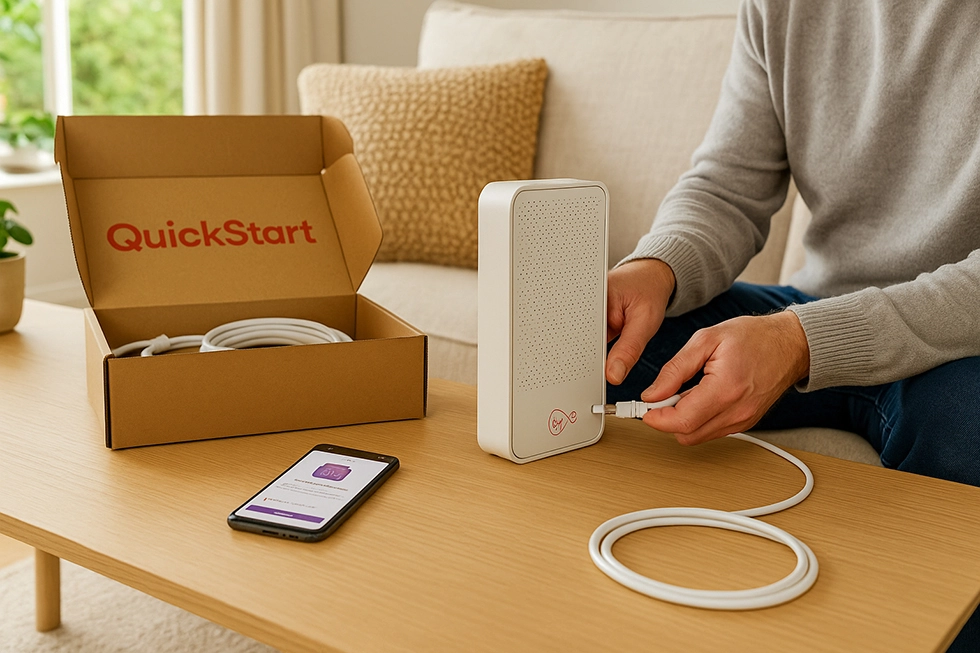
If your home already has a working Virgin Media wall socket, Virgin often offers QuickStart self-install. Virgin posts the Hub and cables. Connect the Hub to the wall socket, power it on, and complete activation in the Virgin Media app or through a browser.
If your property has not had Virgin Media service before, or the existing cabling needs work, Virgin books an engineer visit. The engineer installs or replaces the internal socket, connects the line from the street network, and checks the Hub is online.
After setup, rename your Wi-Fi, change the password, and set up guest Wi-Fi if needed. If you use your own router or mesh system, enable modem mode.
Can I get Virgin Media M350 in my area?
Virgin Media uses its own network rather than the Openreach network used by many other UK providers. Coverage is strong in many towns, cities and suburban areas, but availability still varies by street and sometimes between neighbouring properties.
The most accurate way to check is an address-level lookup. Use our postcode checker, select your exact address, and it will show whether M350 is available.
How good is Virgin Media’s customer service?
Customer feedback is mixed. Many customers are happy with the speeds, especially after switching from older copper broadband.
Common complaints mentioned in Ofcom reporting and in forum discussions include billing and charges, fault resolution time, and problems during cancellations or package changes.
The service experience can vary by area, particularly when local faults affect a street or building.
What does Anytime Chatter include?
Anytime Chatter is Virgin Media’s inclusive calling option for its home phone service. It includes unlimited calls to UK landlines and UK mobiles at any time.
Fair-use rules apply. Calls can have a per-call time cap, so very long calls may need you to hang up and redial to keep them inclusive.
Premium-rate, international, and many non-geographic numbers (including 084, 087, 09 and some 05 ranges) are excluded and billed separately.
What is Flex TV and what channels does it include?
Flex TV is Virgin Media’s flexible TV service delivered through the Stream box. It combines live TV with catch-up and streaming apps in one interface.
Flex gives access to 150+ live channels, plus catch-up players and apps such as BBC iPlayer, ITVX, Channel 4, U, YouTube and more.
You can add and remove premium packs on a monthly basis, including Sky Sports HD, Sky Cinema HD, TNT Sports and kids options.
Does Virgin Media offer free Wi-Fi?
Virgin Media does not offer a BT-style nationwide public Wi-Fi hotspot network for broadband customers. Virgin’s public Wi-Fi hotspots were switched off in November 2023.
Virgin Media still provides Wi-Fi in some specific public locations, such as parts of the London Underground, but this is not a nationwide hotspot service.
Does Virgin Media offer free online security or protection software?
Virgin Media includes Essential Security at no extra cost. It provides network-level protection designed to block known malicious websites and common online threats on your home connection.
Virgin also offers Advanced Security as an optional paid add-on. It provides device-level protection you install on phones, tablets and computers, and it is usually sold with a trial period and then a monthly charge if you keep it.